VICIdial: the complete guide, from dialing to hosting
What VICIdial is, how its calls, campaigns, leads, in-groups and carriers work, and what hosting it takes. Each part links to a deeper guide.

To the point
VICIdial is open-source call center software that dials out, takes inbound calls, or does both on one floor, with Asterisk carrying the calls. It has no license fee and no phone service of its own, so you bring a server and a SIP carrier. This guide follows the order a buyer meets it, and every section links to the post that goes deeper.
- Outbound calls come only from the hopper, paced by the dial level times the agents counted.
- A stock ViciBox 12 lets the whole server place 23 lines, whatever the dial level asks for.
- Inbound calls reach an in-group through a DID, and Next Agent Call chooses the free agent.
- Plan about 58 MB of disk for each agent-hour of raw recording, before the first shift.
- We host it in Ashburn, Hillsboro, New York and San Francisco, from $0.10 an hour.
In this guide
- What VICIdial is, and what it is not
- How a call flows
- Campaigns and dial methods
- Leads, lists and the hopper
- Inbound: DIDs, in-groups and routing
- Carriers and SIP
- Agents, phones and WebRTC
- Reporting
- Do-not-call lists and the opt-out key
- Hosting it: your own server or a managed one
- Glossary pointers
We host VICIdial for a living, so read the hosting section with that in mind. Many figures below come from ViciBox 12 test servers running VICIdial 2.14.
What VICIdial is, and what it is not
VICIdial runs a call center floor: outbound campaigns, inbound queues, agents in a browser, recordings and reports. The code is open source under the AGPL. Nobody charges you for the software, and there is no fee per agent seat.
Free software is not a free call center. Is VICIdial free? lists the monthly lines that remain: the machine, the carrier, the disk, the patching and somebody's hours. On a busy floor the carrier is usually the biggest recurring bill, whoever hosts the server.
Three things VICIdial is not:
- A phone company. It comes with no minutes and no numbers. You buy those from a carrier, usually by the minute for outbound calls and by the month for each inbound number.
- A product with a release schedule. The project's last stable release came out in 2016. Fixes land in the source tree, and since 2024 two critical flaws have been published that work without a login.
- GoAutoDial. GoAutoDial is a distribution built from VICIdial, with its own admin screens (GOadmin) and reports (GOreports). Little else about the difference can be sourced, so our comparison gives you a test plan for one afternoon instead of a verdict.
If you are starting from zero, the first 30 days puts the work in order. Week one sets up the server, the carrier, the phones and one manual-dial campaign with three people. Week two adds a 200-row list, audio, do-not-call and calling hours. Week three turns on auto-dial at level 1.0 or 1.5 with the real-time screen open. Week four covers disk, backups and room for ten more agents.
How a call flows
This guide follows four paths a call can take. Knowing which one a call took tells you where to look when it goes wrong.
Outbound
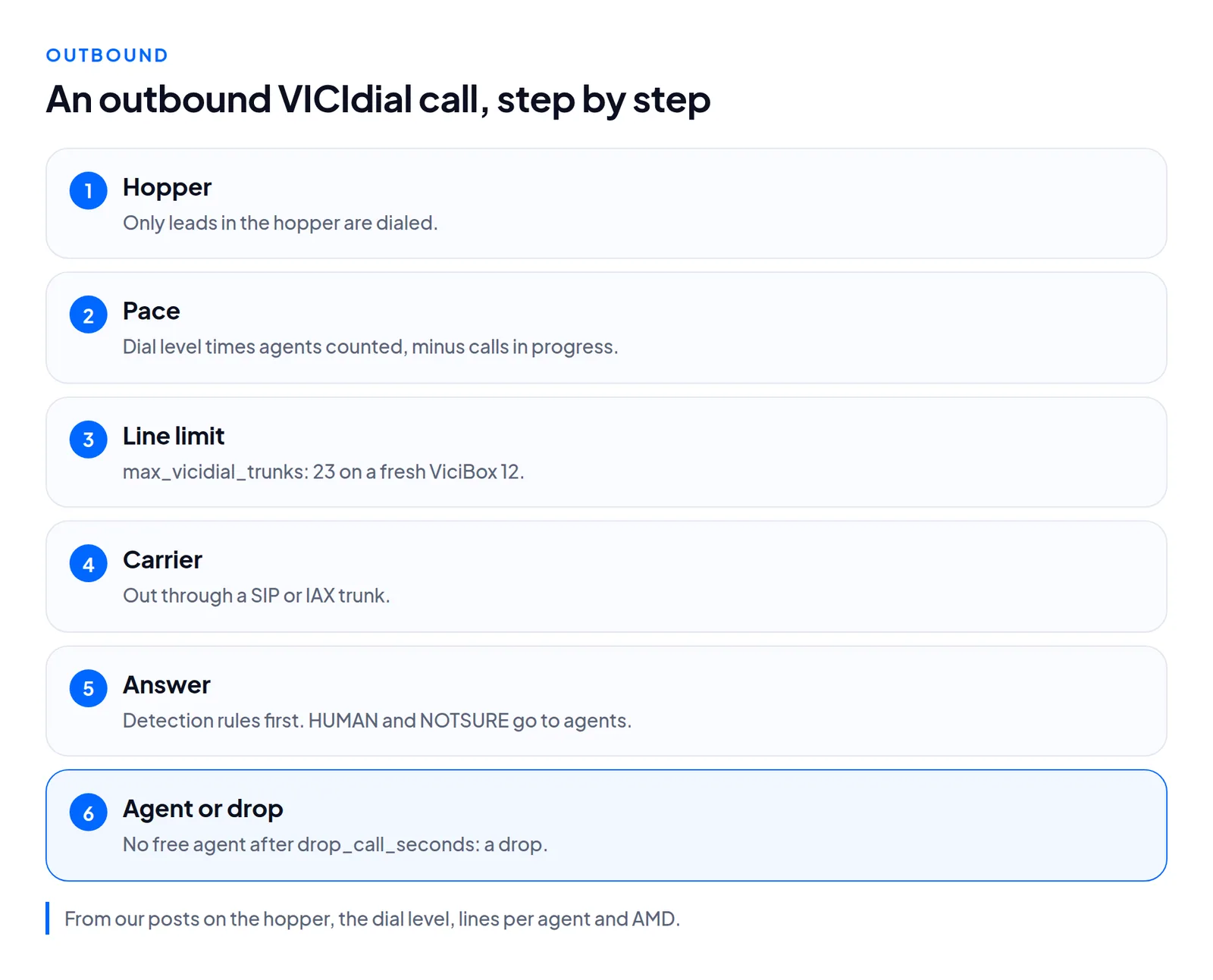
- The hopper. VICIdial only dials leads that are in the hopper, a small table of each campaign's next leads. A script tops it up about once a minute.
- The pace. Each loop, the dialer multiplies the dial level by the agents it counts, then subtracts calls already in progress. Ten ready agents at level 2.0 means a goal of 20 lines.
- The line limit. The server then applies its own cap,
max_vicidial_trunks. A fresh ViciBox 12 sets it to 23, and calls over the cap are simply not placed. No error appears. - The carrier. Each call goes out through a carrier, a SIP or IAX trunk to a phone provider.
- The answer. Most calls never reach a person: they ring out, come back busy or hit a machine. On a campaign with answering machine detection, the detector rules first. HUMAN and NOTSURE go to agents unless you change it.
- The agent. A person who answers is connected to a free agent. If no agent frees up within
drop_call_seconds, the call counts as a drop anddrop_actiondecides what the caller hears.
Inbound
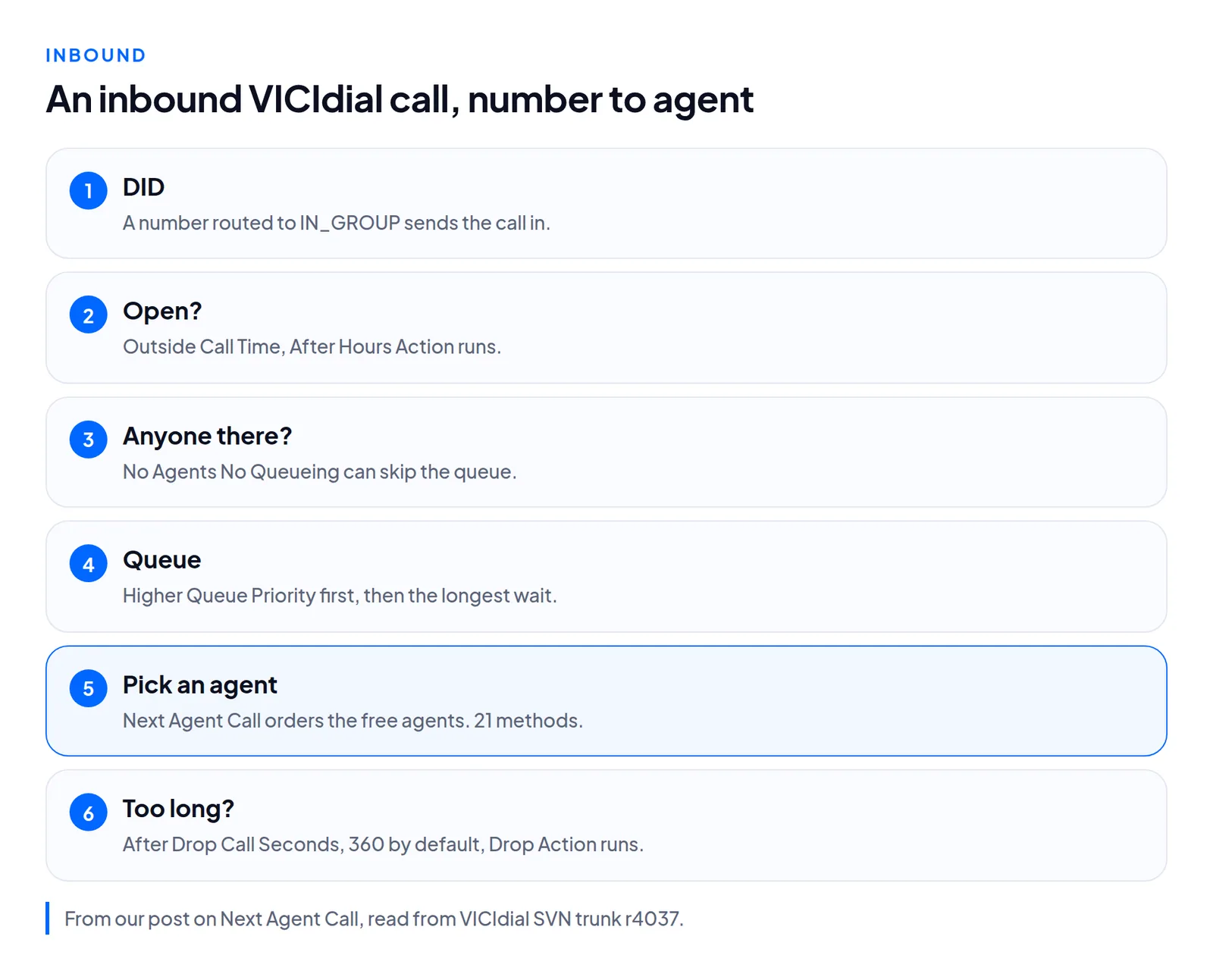
Someone calls one of your numbers. VICIdial calls an inbound number a DID, and routes each DID to an in-group or an agent. A DID routed to IN_GROUP hands the call to an in-group, which is VICIdial's word for an inbound queue. The in-group checks its hours, then whether anyone could answer, and then queues the call. When an agent who takes that in-group is free, its Next Agent Call setting decides which agent gets the call.
Blended
A blended agent takes inbound and outbound calls in the same session. The campaign needs Allow Inbound and Blended set to Y, and the agent ticks BLENDED at login. A MANUAL campaign offers no in-groups at login at all.
A higher Queue Priority is answered first. A campaign's defaults to 50 and an in-group's to 0. Our reading of those defaults, not a line VICIdial states: in a blended campaign, waiting outbound calls go ahead of inbound ones.
Press-1
A press-1 call starts outbound and finishes like an inbound one. VICIdial has no press-1 campaign type. It builds one from an outbound campaign, a call menu, and an in-group when agents take the calls. Once a person answers, VICIdial's survey script passes the call to the call menu, and the key pressed chooses the option. Press-1 routing follows each route on real calls.
Campaigns and dial methods
The campaign is where pacing lives. Its dial_method field says who sets the pace:
| Method | Who sets the pace |
|---|---|
MANUAL | Each agent dials one number at a time |
RATIO | You fix the lines per agent |
ADAPT_* | A script steers toward a drop limit (four variants) |
SHARED_* | Five methods for campaigns that dial across several servers |
INBOUND_MAN | Agents dial by hand between inbound calls |
When people say "predictive", they usually mean the ADAPT_* methods, and sometimes RATIO above 1.0. What a predictive dialer does shows one pacing loop with numbers.
Dial level
auto_dial_level is a multiplier. With RATIO it stays where you set it. With an ADAPT_* method, a second script, AST_VDadapt.pl, recalculates it every 15 seconds while agents are logged in, never above adaptive_maximum_level. Do not run an adaptive method with only one or two agents, because the averages it depends on turn into noise. The fields and the counting rules are in dial level explained.
Drops
A drop is a call reported as answered that never reached an agent. The target sits in one field, adaptive_dropped_percentage, and only the ADAPT_* methods read it. The script resets the level every 15 seconds and counts drops again once a minute, so the number is something it aims at, not a ceiling it enforces. On RATIO, nothing holds the drop rate down. You move the level yourself. The default drop_action audio, buzz, is a sound 0.22 seconds long, not a message. The abandon rate post covers each field.
Lines
Twenty agents at level 3 ask for 60 lines. A stock ViciBox 12 places 23 of them. The gap is counted as local_trunk_shortage, which the real-time report shows as TRUNK SHORT. The dialer reads the limit again about every 25 seconds, so a change takes effect live. auto_dial_limit only sets the top entry of a drop-down menu. Lines per agent has the table.
When a campaign dials and agents still sit in READY, the problem is pace, not leads. Agents idle while dialing checks the server's line limit first, then method and level, then the counting rule, and the list last.
Answering machine detection
On ViciBox 12, AMD campaigns call Asterisk's AMD() with eight values written into the dialplan: AMD(2000,2000,1000,5000,120,50,4,256). Those eight override /etc/asterisk/amd.conf; the remaining amd.conf settings still apply. See 8 values inline, 2 left to amd.conf. Averaged per outcome, a decision took 2.9 to 4.8 seconds across 22,954 decisions.
How good is it? Of those decisions, 57% were MACHINE, and none of those calls reached an agent, so nobody checked them. Agents marked 182 of 3,856 HUMAN calls as machines, which is 4.7%. And 85% of NOTSURE calls were not machines. The numbers are in AMD accuracy.
Press-1 campaigns
Our console builds a press-1 campaign on one sheet with three parts: Dial, They hear and They press. Create writes every VICIdial piece in one run and takes all of it back out if any step fails. A key can send the caller to a queue, to a number through one of your carriers, or to another server by IP. With Leave a message picked for machines, VICIdial waits until the greeting finishes and then plays your recording. The steps are in building a Press-1 campaign.
Leads, lists and the hopper
Loading leads
add_lead is VICIdial's own API call. It puts one lead into one list, and it needs four fields: phone_number, phone_code, list_id and source. Leave out list_id and the lead goes into list 999 without an error, so send list_exists_check=Y on every call. Pick the duplicate_check scope on purpose (DUPLIST, DUPCAMP or DUPSYS) and read the first line of each reply. In our runs a 1,000-row file loaded in 5.0 seconds, about 209 rows a second, with four loops running at once on the dialer. Details are in loading leads with add_lead.
The hopper
The hopper is the short queue of leads a campaign will dial next. Once a minute, the hopper script fills it and writes down why it could or could not. That note sits in vicidial_campaign_stats_debug, in the row whose server_ip is HOPPER. The script applies its rules in a fixed order, so the first rule that fails is your answer.
Two traps from reading the hopper: an expired list hides its leads as completely as an inactive list does, and calling hours are tested at 104 GMT offsets in quarter-hour steps.
"No more leads in the hopper for campaign" is a manual-dial message. An agent sees it after clicking DIAL NEXT NUMBER when the server has no lead to hand over, and an auto-dial campaign never shows it. On a MANUAL campaign the Minimum Hopper Level sets the hopper's size. "Leads to be dialed" and "leads in the hopper" are two different counts, and fixing the message reads both.
Clocks and time zones
Each lead carries its own GMT offset, set from its area code. The hopper measures every calling window against servers.local_gmt, not against the operating system clock, and that setting ships as -5.00. A server nobody corrected is five hours off wherever it is: on a ViciBox 12 server we read, the system ran on UTC while local_gmt said -5.00, so a 9am to 9pm window opened and closed five hours wrong. A 24hours call time hides the problem. Four commands find it, in time zones and local_gmt.
IDs and spelling
MySQL treats Blended and BLENDED as the same campaign id, and VICIdial can hold both spellings in different tables at once. Campaign ids, in-group ids, user names, carrier ids and DID route names are all affected. List ids are numbers, so they are safe. See case-insensitive ids before you write code that compares them.
Inbound: DIDs, in-groups and routing
Who gets an inbound call
An agent takes an in-group only when two things are true: their campaign allows that in-group, and their session has selected it. Among waiting calls, the higher Queue Priority goes first, then the longest wait. The in-group's Next Agent Call puts the free agents in order. admin.php offers 21 methods on the in-group page, and the database default is longest_wait_time. ring_all rings every available agent whose phone has On Hook Agent enabled, and VICIdial's help text means it for a few agents on quiet in-groups. After Drop Call Seconds, 360 by default, the in-group's Drop Action takes over. All 21 methods are listed in Next Agent Call explained.
Changing who takes what
On the Trustane Floor, right-click an agent to choose which of their campaign's in-groups they take, or right-click an in-group to add or remove several people, up to 40 per click. Both go through VICIdial's agent API function change_ingroups once the server has checked VICIdial's rules. A Floor change applies to the agent's current session only. It only works when the campaign takes inbound calls and its dial method is not MANUAL. The walkthrough is assigning in-groups from the Floor.
Adding numbers in bulk
Build one DID, test it, then clone it with the API function copy_did. In our test, add_did loaded 200 numbers in 40.5 seconds, one per request. copy_did loaded 300 in 1.9 seconds, 100 per request. A new DID took a call two seconds after the API answered, with no reload. Count the reply lines, because the last line can say SUCCESS when a number was skipped. The steps are in bulk-adding DIDs.
Prompts and hold audio
VICIdial's audio store checks files and converts none of them. A prompt plays only as an 8 kHz, mono, 16-bit signed PCM WAV with a GSM copy, uploaded through the admin store. Names must end in .wav or .gsm, so MP3 and M4A are refused. A file copied straight into the sounds directory plays on that one server only. Two sox commands make the right files, in audio upload and conversion.
Where a press-1 key goes
Under the hood, a queue key is an INGROUP option with the handle method CLOSER. An outside number is an EXTENSION option into a carrier's own dialplan. Another server is a SIP dial to its address, and that server has to accept calls from yours. No key and a wrong key map to the menu's TIMEOUT and INVALID options.
Carriers and SIP
VICIdial keeps carriers in vicidial_server_carriers. The details depend on which SIP stack your Asterisk runs.
chan_sip and PJSIP
Asterisk 21 and later ship without chan_sip. A VICIdial carrier written for chan_sip has to be rewritten as PJSIP before the server can run a current Asterisk. ViciBox 12 runs both stacks side by side: chan_sip holds UDP 5060 and PJSIP listens on 5061. That makes it a safe place to convert one carrier at a time. One chan_sip section turns into three or four PJSIP sections. Convert a copy under its own dial prefix, and retire the original only after the copy has carried real calls. See chan_sip to PJSIP.
Writing a PJSIP carrier
On Asterisk 22.5.1 under Ubuntu 24.04, a carrier had to be written as complete PJSIP objects, because VICIdial pastes your text into Asterisk's generated files. A carrier saved with protocol SIP shows as active, and its peer never loads, since Asterisk 22 has no chan_sip. A registration that got one fatal reply, a 404, stayed Rejected, and Asterisk did not retry it on a timer. PJSIP carrier setup has four tested definitions.
When a carrier refuses a call
A carrier's SIP reply says either that the carrier failed or that the number did. Only the first kind is worth trying on another carrier. The rule we tested retries 408, 480, 500, 502, 503 and 504, and ends the call on 404, 486, 487 and every other final failure. With 50 calls per case in a SIP proxy, a 503 from the first carrier went to the second, which answered all 50. A 404 or 486 ended all 50 on the first carrier. See SIP codes: carrier down or bad number.
Caller ID
The dialer checks a campaign's cid_group_id on every call unless the value is exactly ---DISABLED---. Six rules run in order and the first number found wins. A CID group beats the older area-code list, and a list-level override beats a campaign-level group. A group name that does not exist falls through without a warning. vicidial_dial_cid_log records which rule won each call. See CID groups and AREACODE.
Which carrier carried a call
Read call_log. The table named for carriers, vicidial_carrier_log, stores the Local leg in its channel column, so grouping by it credits every call to "Local". It is also usually empty, because it needs SIP event logging switched on. Join call_log to vicidial_log on uniqueid for outbound calls, and to vicidial_did_log for inbound. See call_log vs carrier_log.
On our servers you bring any SIP carrier, and we take nothing from your minutes.
Agents, phones and WebRTC
Each logged-in agent has one row in vicidial_live_agents. Its status is one of six: READY and CLOSER both mean waiting (CLOSER is how a waiting agent on an inbound or blended campaign shows), INCALL means on a call, PAUSED means not taking calls, and QUEUE and MQUEUE are the other two. The same word CLOSER on a dialer call's row means that call is bridged, not waiting.
Browser phones
On ViciBox 12, a browser phone is a chan_sip peer by default, built from the template vicibox-RTC, even though PJSIP runs on the same server. So when a phone registers and you cannot find it, look in both stacks: sip show peers and pjsip show contacts. Reload both after a change. There is no template named WebRTC. A browser phone also needs a valid certificate name, a WebSocket it can reach and permission to use the microphone. See WebRTC phones on ViciBox 12.
LAGGED agents
An agent shows LAGGED when the server has heard nothing from their browser for 30 seconds. In one investigation we logged 72 LAGGED pauses in a day while the server sat 71% to 95% idle. 74% showed irregular gaps, often several agents together, which points at the network. 19% showed gaps of almost exactly 60 seconds, one agent at a time, which is Chrome slowing a background tab. The server was never the cause, and tuning its TCP did not change the rate. See LAGGED agents.
Bandwidth
Plan about 80 kbps each way per agent on a G.711 call, and about 90 kbps once Ethernet and encryption overhead are added. G.729 or GSM brings that down to roughly 24 to 30 kbps. The server carries two legs for each call, so its total doubles: 20 connected G.711 calls need about 3.2 Mbps each way there. To leave room for the browser page, budget 100 kbps each way per agent. These are sums from packet sizes, not readings from a live floor. See bandwidth per agent.
The route to your agents
Packet loss belongs to a route between two networks, not to a provider. We saw one office lose about 20% of packets from a US East data center, at 288 ms, and 0% from Helsinki, at 169 ms, with the same provider and server type at the same hour. Trace from two candidate data centers at once, during your busy hour. See where to host VICIdial.
Reporting
The real-time screen
Read the top block before the agent grid. The top block shows whether the dialer is producing calls, and the grid shows what agents do with them. The screen refreshes every 40 seconds by default, so treat it as a snapshot. Dropped percent is drops over answered calls, not over everything dialed. The all-campaigns drop figure averages each campaign's own percentage. Column by column, in the real-time report.
Load history
On a stock server, servers.sys_perf_log is N, so the server_performance table stays empty and there is no load history. Switched on, it writes about one row every 5 seconds per server. AST_update.pl reads the flag only when it starts, so it needs a restart, and the keepalive relaunches it in about a minute. Until then, a moving local_trunk_shortage tells you the 23-trunk limit was the cap. See sys_perf_log and capacity.
Logs worth knowing
call_lognames the carrier for each call.vicidial_dial_cid_lognames the caller ID rule that won.vicidial_amd_logkeeps the detector's decisions.
Recordings and transcripts
Raw recording runs about 58 MB per agent-hour, a planning figure. One agent working eight-hour days makes 464 MB a day, and ten agents make about 102 GB in 22 working days. Recordings share the disk with the database. A full disk stops recording first and then stops the database writing. How long to keep them is your decision, and the period is yours to look up. See recording storage per agent.
To turn recordings into text: on clean English and Spanish phone audio, the engines we tried had word error rates of 0.6% to 4.9% across eight setups. Speaker labels failed on mono audio, where 2 of 15 files came back with one speaker on the cheapest setup. Stereo files with one speaker per channel were attributed correctly on all 15. Cost ran from $0.0027 to $0.024 per audio minute. See transcribing call recordings.
Is anyone on the server?
The database records what VICIdial means to do, so it can look quiet while calls are still up. A server is idle only when Asterisk reports zero channels on every live node: asterisk -rx 'core show channels count'. Take the reading twice, a few seconds apart. See is the server idle?
Do-not-call lists and the opt-out key
VICIdial supplies lists and switches. Which numbers go on them, and which rules apply to your calls, is for you to decide. This section covers the mechanics only.
Do-not-call lists
VICIdial keeps one internal do-not-call list for the whole system and a separate list per campaign. A new campaign checks the system-wide list by default (Use Internal DNC ships as Y) and its own list only when you switch Use Campaign DNC on; both also offer an AREACODE option, and Other Campaign DNC is empty by default. Numbers get in four ways: an agent's disposition, the admin page, the add_dnc_phone API (one number per request), and an opt-out key on a call menu. add_lead can also screen leads as they load, through dnc_check and campaign_dnc_check, but neither screens anything unless you send Y. See VICIdial DNC lists.
The opt-out key
On our Press-1 sheet, give one key the Opt out route, 9 for example. A caller who presses 9 goes onto your do-not-call list. No key and Wrong key have routes of their own, and neither can opt anyone out: nobody chose that by staying silent or by a slip of the finger.
Drop settings
The drop target is adaptive_dropped_percentage, read only by ADAPT_* methods, and it is an aim rather than a cap. drop_call_seconds sets how long an answered call waits for an agent, and drop_action sets what that caller hears. The manual's recipes use 5 seconds. Which limit applies to your calls is yours to look up.
Calling hours
A campaign's call time is applied in the local time of the area being called, which comes from each lead's own GMT offset. The hopper measures those windows against servers.local_gmt, which ships as -5.00: if it is wrong, every window moves by the difference. Check it before the first live shift.
Hosting it: your own server or a managed one
Your own server, or someone else's
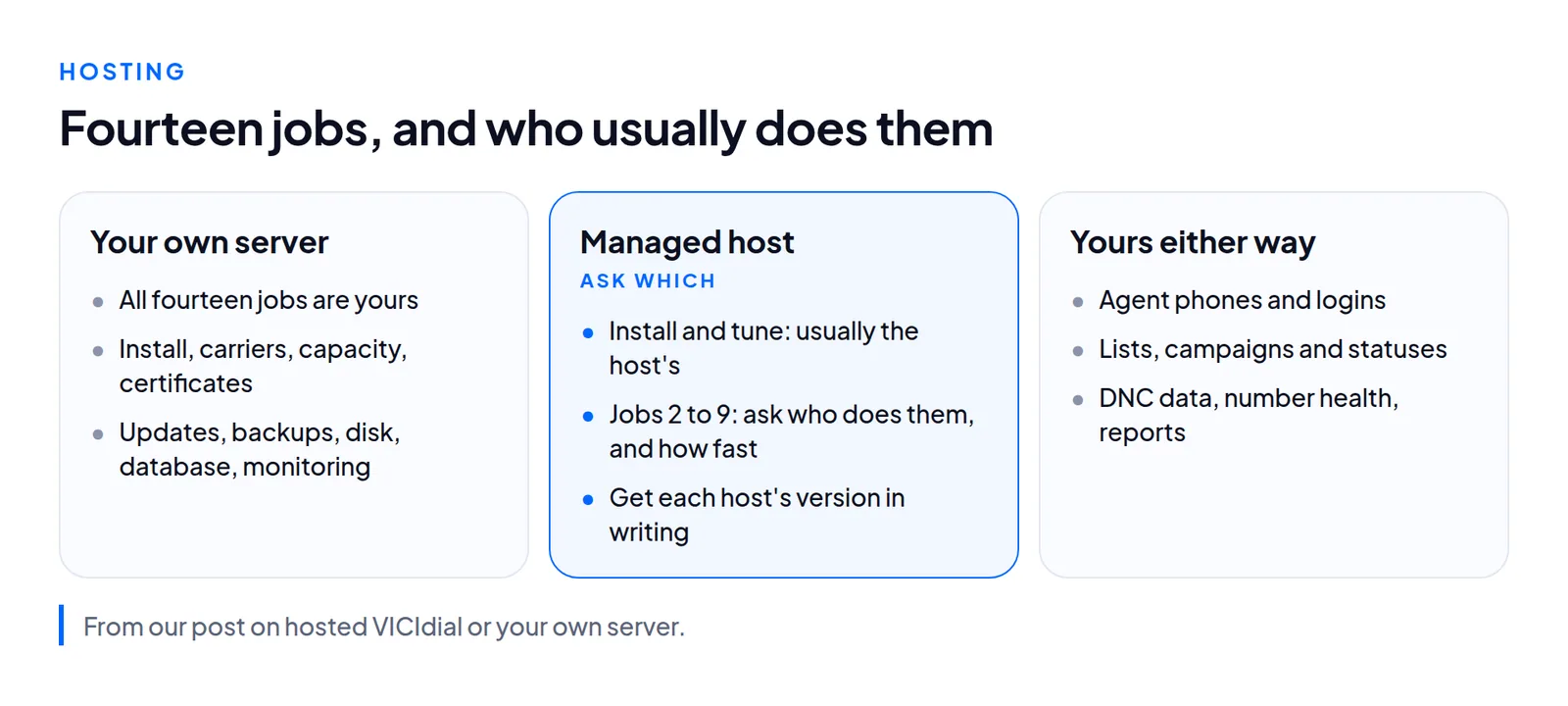
Hosted or self-hosted splits the work into fourteen jobs. Self-hosting means all fourteen are yours. A managed host takes some of them, and you ask which. Five stay with you either way: lists and campaigns, agent phones and logins, DNC data, number health, and reports. We have not measured the hours per month, so that post shows how to log your own over four weeks. Self-hosting fits a team with an engineer who has run VICIdial and a second person who can cover.
If you run your own, these posts cover the jobs in order:
- Build. From a prepared image, a server was up and configured in 32 to 40 seconds on Hetzner and 60 to 72 on DigitalOcean. A full install from plain Ubuntu took 17 minutes, 11 of them compiling Asterisk. See build times and VICIdial on DigitalOcean.
- Install traps. On Ubuntu 24.04 a healthy build ends with 13
screensessions that stay at 13. Truncatedpsoutput, a stale/etc/timezone, a manager interface open on0.0.0.0and cloud-init re-enabling SSH passwords each look like something else. See Ubuntu 24.04 install traps. - ViciBox 12 after install. On our snapshots
firewalldwas not running and hung on dbus, and a reboot took over 180 seconds. Get the certificate issued while ports 80 and 443 are still open. See ViciBox 12 after install. - Security. Key-only SSH, a default-deny firewall, the manager interface on port 5038 bound to
127.0.0.1, and API calls sent by POST. See securing a VICIdial server. - Backups. A nightly compressed database dump kept off the server, 14 of them, each proven by a restore. One real dump was 2,933 MB, 411 MB compressed, and its restore check took 20.5 seconds. See backups: what to keep.
- Moving. Check
db_schema_versionfirst, skip the eight MEMORY tables and the oldserversrow, and rewrite everyserver_ipcolumn. Recordings move separately. See moving a server and connecting an existing server, where/etc/astguiclient.confturned out to hold the database name, user, password, host and port.
Sizing
Size a server by lines, not agents: the dial level times the agents available. At its busiest, one floor we studied ran 62 calls at once with 19 agents, about three lines per agent. A stock ViciBox 12 would cap that floor at 23, so raise max_vicidial_trunks before you pay for a bigger box. Our price list gives each size's simultaneous call channels, measured with recording on and the ulaw codec. A 3 vCPU, 4 GB server carries 105, a 4 vCPU, 8 GB server carries 245, and larger sizes reach a ceiling of 500. Add 100 kbps each way per agent and 58 MB of disk per agent-hour.
Cost
Price the whole list: server, carrier, numbers, disk, backups, updates and staff time. Compare totals, not headline rates.
Our prices on 7 November 2026: a VPS from $0.10 an hour (3 vCPU, 4 GB, capped at $70 a month in Ashburn), dedicated cores from $0.29 an hour (4 cores, 8 GB, capped at $210 a month in New York), or $29 a month flat to run VICIdial on hardware you own. Each server draws by the hour up to its monthly cap, and destroying it stops the charges. There is no setup fee, no per-agent license and no markup on your minutes. See VICIdial pricing for every size.
US locations
We build in four US cities. The cheapest size of each kind, per hour, on 7 November 2026:
| City | VPS from | Dedicated from |
|---|---|---|
| Ashburn | $0.10 (3 vCPU, 4 GB) | $0.39 (4 cores, 16 GB) |
| Hillsboro | $0.10 (3 vCPU, 4 GB) | $0.39 (4 cores, 16 GB) |
| New York | $0.23 (8 vCPU, 16 GB) | $0.29 (4 cores, 8 GB) |
| San Francisco | $0.12 (4 vCPU, 8 GB) | $0.29 (4 cores, 8 GB) |
A server is built in about two minutes, and its VICIdial logins appear in your portal. The free trial is one VPS server for 7 days in Ashburn or Hillsboro, with no card. Top up to keep it. Otherwise it stops when the trial ends and is deleted a day later. New York and San Francisco run as paid servers. Choose by measuring the route to your agents first, then see VICIdial hosting in the US or what managed hosting includes.
Moving from another host? We build the new server beside the old one, test it, and cut over at the start of a shift. The old server stays reachable for a week. Migration is free on Dedicated plans and quoted on VPS. See how a migration works.
Glossary pointers
The terms that cause most of the confusion, each with the post that explains it. The full list is in our VICIdial glossary.
- Hopper: the short queue of leads a campaign dials next. Reading the hopper.
- Dial level: lines per counted agent. Dial level explained.
- Drop: an answered call that found no free agent. Abandon rate.
- Trunk: one outbound line, capped per server by
max_vicidial_trunks. Lines per agent. - In-group: an inbound queue. Next Agent Call.
- DID: an inbound number and its route. Bulk-adding DIDs.
- CID group: a named set of caller IDs. CID groups.
- AMD and NOTSURE: machine detection, and its verdict when it cannot decide. AMD accuracy.
- LAGGED: 30 seconds with no check-in from an agent's browser. LAGGED agents.
- Local GMT: the server's offset the hopper uses for each lead's local time. Time zones.
Questions people ask
Is VICIdial free?
The software is. It has no license fee and no seat limit. A working floor still pays for a server, a carrier, numbers, disk, backups and someone's time.
How many agents fit on one VICIdial server?
It depends on lines, not seats. Multiply the dial level by the agents available, then check max_vicidial_trunks, which is 23 on a stock ViciBox 12. Codec and recording change the answer too, which is why our price list states call channels per size.
Does VICIdial include phone lines?
No. You connect a SIP carrier, or several. On our servers you bring your own, and we take nothing from your minutes.
Why is my campaign not dialing?
Read the hopper first: the HOPPER row in vicidial_campaign_stats_debug usually names the reason. If calls go out and agents still wait, check the server's line limit next.
Where should a US call center host VICIdial?
Trace the route from each candidate data center to your agents' office at your busy hour, and pick the one with the cleaner path. We build in Ashburn, Hillsboro, New York and San Francisco, and the free trial runs in Ashburn or Hillsboro.
Next steps
Start with one call that works end to end, then add lists, rules and auto-dial. When you want a server, try one free for 7 days in Ashburn or Hillsboro from the order page, compare US locations and prices, or move an existing floor.
VICIdial is a trademark of its owner.
Sources
- Trustane, A VICIdial glossary
- Trustane, What a predictive dialer does, with a VICIdial example
- Trustane, Dial level in VICIdial, and its claims register
- Trustane, Why VICIdial is not dialing
- Trustane, VICIdial Next Agent Call, and its claims register
- Trustane, Press-1 in VICIdial, and its claims register
- Trustane, Setting up a PJSIP carrier on Asterisk 22, and its claims register
- Trustane, Carrier down or bad number, and its claims register
- Trustane, VICIdial DNC lists
- Trustane, Is VICIdial free?
- Trustane, Hosted VICIdial or your own server
- Trustane, Managed VICIdial hosting in the US, read 7 November 2026
- Trustane, VICIdial pricing and price list, read 7 November 2026
- Trustane, Migrate, read 7 November 2026
- Every claim in this guide, with the post it comes from
Managed VICIdial hosting