Securing a VICIdial server: SSH keys, firewall and the scanners
Key-only SSH, a drop-in ordering trap, a default-deny firewall, a manager interface on loopback and API passwords kept out of logs.
To the point
Turn off SSH password login, put a default-deny firewall in front of everything the dialer does not need on the internet, and keep the API password out of query strings and process lists. None of this makes a server immune. It removes the cheap routes.
- SSH: key-only, in a drop-in file named
00-hardening.confso it sorts first. - Firewall: drop by default, your own address allowed first, a way for agents to join the list.
- Manager interface on port 5038: bind it to
127.0.0.1. - API calls by POST, password from a
chmod 600file, nothing inargv.
Anything with port 22 open and passwords accepted gets scanned and tried all day. Nobody is targeting you in particular.
SSH: keys only, and make it stick
A drop-in file, never an edit of the main sshd_config:
# /etc/ssh/sshd_config.d/00-hardening.conf
PermitRootLogin prohibit-password
PasswordAuthentication no
KbdInteractiveAuthentication no
MaxAuthTries 3
prohibit-password lets root in with a key and refuses a password. KbdInteractiveAuthentication no closes the other route to a password prompt that people forget.
Change SSH without locking yourself out
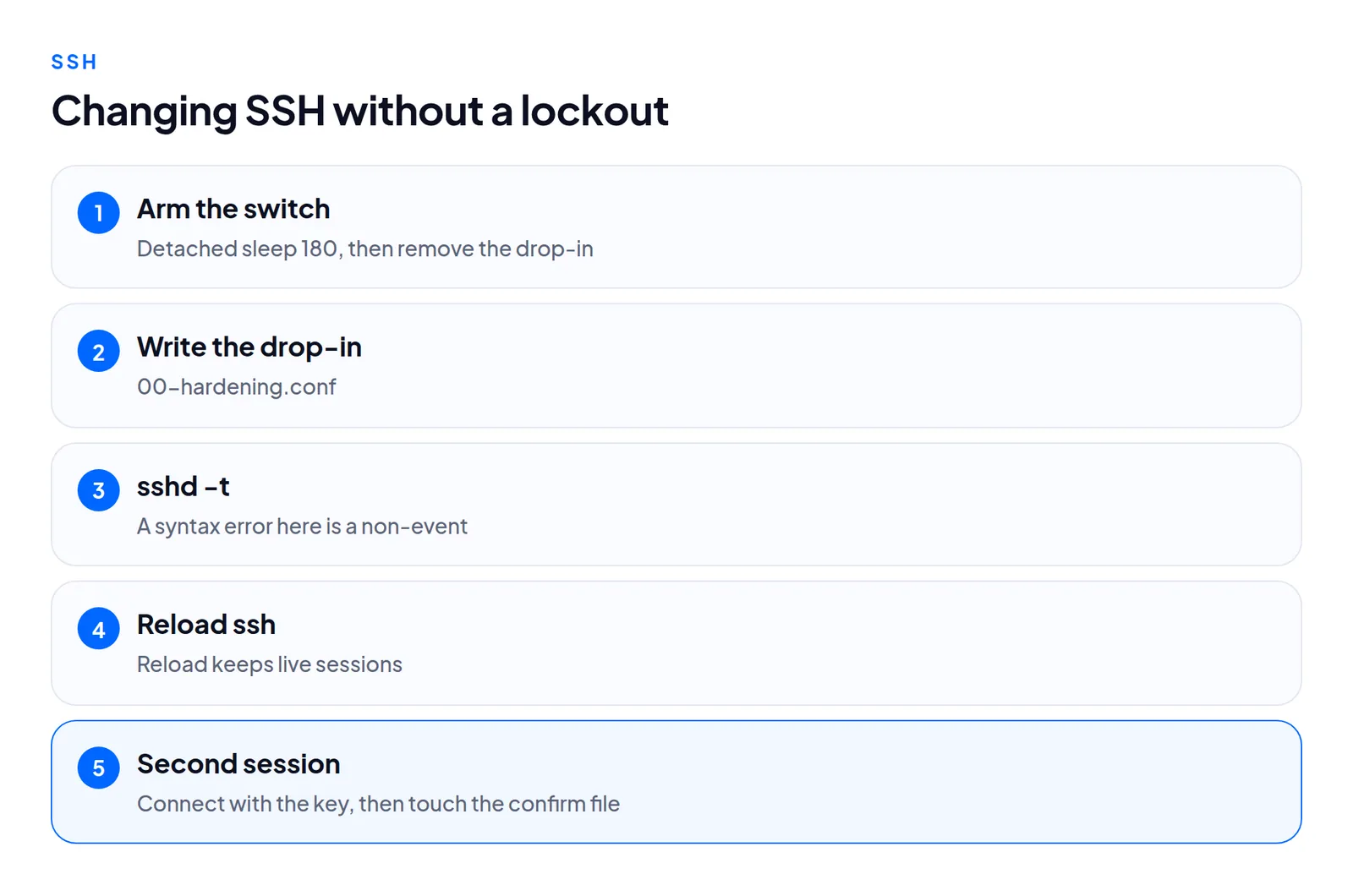
Arm the dead-man switch first: a detached sleep 180 && rm the-drop-in && reload, cancelled by touching a confirm file once the second, key-only connection works.
Prove it
Do not check the config file. Ask the server what it accepts:
ssh -o PreferredAuthentications=password -o PubkeyAuthentication=no -o BatchMode=yes host trueThe refusal reads Permission denied (publickey) or lists methods. The word password must not be among them.
Firewall: default deny, with a way in for agents
An open VICIdial server exposes the admin pages, the agent screens, SIP and the manager interface. A default-deny policy with an allowed list is the simplest fix, provided agents can reach the list without calling you.
On ViciBox 12 clones (see ViciBox 12 after install) we use nftables with a drop policy and your management address allowed first. A self-service page lets an agent log in with a VICIdial credential. Their address joins the allowed set within about 30 seconds and ages out after 14 days.
Three order rules:
- Issue the certificate before you close ports 80 and 443. Let's Encrypt needs both.
- Move SSH to a new port after the firewall allows your address on it.
- Never run
firewall-cmd --reloadover a remote connection on the ViciBox firewall tooling that worked for us.
Check your cloud image too. A DigitalOcean Droplet we tested had no firewall, ufw was masked, and UDP 5060 and the 10000 to 30000 media range reached it from outside. A provider firewall is a good second layer, not a replacement.
The manager interface
The default install.pl writes manager.conf with bindaddr = 0.0.0.0, six users, no permit restriction and VICIdial's default secret. The daemons connect over loopback, so binding to 127.0.0.1 cost nothing in our measurements.
ss -ltnp | grep 5038Then read every other listener with ss -ltnp and ss -lunp. FastAGI, an IP relay helper and the DUNDi port are often left public.
API passwords: out of logs and process lists
VICIdial's non_agent_api.php and agc/api.php take a user and password as parameters.
- In the URL (a GET) the web server writes it to the access log in the clear, where backups and log shippers copy it.
- On the command line it is visible in
psto every local user.
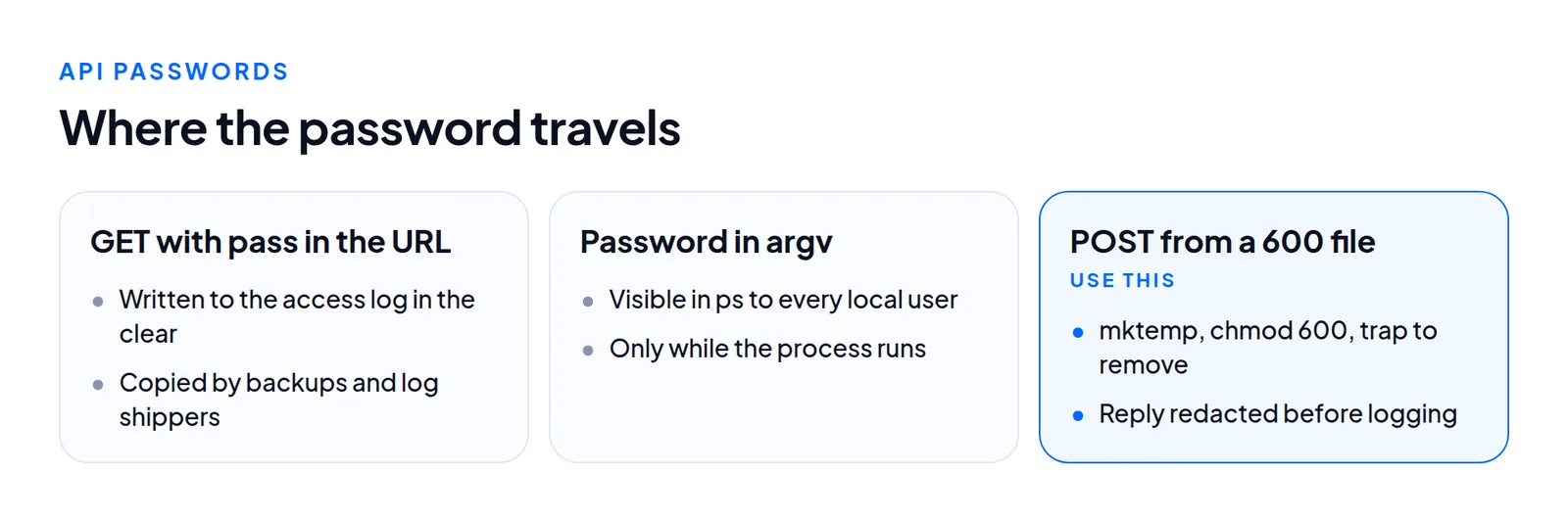
Use mktemp, chmod 600 before the write, --data-urlencode "pass@$FILE", and remove the file in a trap. On a test dialer set up this way, pass= appeared in none of 1,094 access log lines.
What this does not cover
We did not penetration-test VICIdial itself and have no CVE list for a given revision. Keep the dialer updated on a schedule you control. Disk encryption, intrusion detection and compliance regimes are out of scope. Key-only SSH does nothing for a weak admin password on the web interface, which agents can reach by design.
Questions people ask
Why did my hardening file not work?
Probably its name. sshd keeps the first value it reads, so 99- loses to a cloud-init file that sets passwords on. Name it 00-.
Is a password in argv as bad as one in a URL?
Smaller, because the reader must be a local user. Still worth fixing, since the web user is who an attacker becomes after a web flaw.
Next steps
- Password SSH off, proven with the password-only test.
00-drop-in plusssh_pwauth: false.- Default-deny firewall with a managed allowed list.
- Manager interface on loopback, then a look at
ss -ltnpafter every install.
Servers built this way are what VICIdial hosting delivers. See pricing or order one.
VICIdial is a trademark of its owner. Trustane is an independent hosting provider.
Sources
- Security sweep, escaping, credential transport and findings by severity
- OpenSSH manual, sshd_config
- OpenSSH manual, ssh
- Cover photo by Nathan Thomas on Pexels
Managed VICIdial hosting