Uploading audio to VICIdial: why your prompt will not play
VICIdial's audio store checks files but never converts them. The format it wants, the two sox commands that produce it, and how to verify the result.
To the point
VICIdial's audio store checks the files you give it and converts nothing. A prompt plays only if it is an 8 kHz, mono, 16-bit signed PCM WAV (plus a GSM copy), uploaded through the admin store rather than copied into the sounds directory.
- Upload names must end in
.wavor.gsm. MP3 and M4A are refused. - Two
soxcommands produce the right files, andsoxiverifies them. - On the server we examined, the stock library held 1,646
.gsmfiles and 61.wav. - A copy placed straight in the sounds directory plays on that one server only.
What the upload page accepts
We read audio_store.php and its sync script on a ViciBox 12 server while building our own audio manager. The rules:
- The name must end in
.wavor.gsm. - A WAV must be exactly 8000 Hz.
- The page strongly recommends 16-bit mono 8 kHz PCM.
A file can pass rule 2 and still be wrong. To be marked good for Asterisk, a WAV must be 8000 Hz, one channel, 16 bits and signed PCM, all together. A stereo 8 kHz WAV is uploaded and still fails. Studio files and phone voice memos are usually 44.1 or 48 kHz stereo, often MP3 or M4A.
The conversion
Two commands. sox was installed on our ViciBox server.
sox input.mp3 -r 8000 -c 1 -b 16 -e signed-integer welcome.wav
sox welcome.wav -r 8000 -c 1 welcome.gsm
-r 8000resamples to the telephone rate.-c 1mixes down to one channel. It mixes; it does not drop a side.-b 16 -e signed-integergives 16-bit signed PCM.- The second command makes the GSM copy from the converted WAV, so the two cannot disagree.
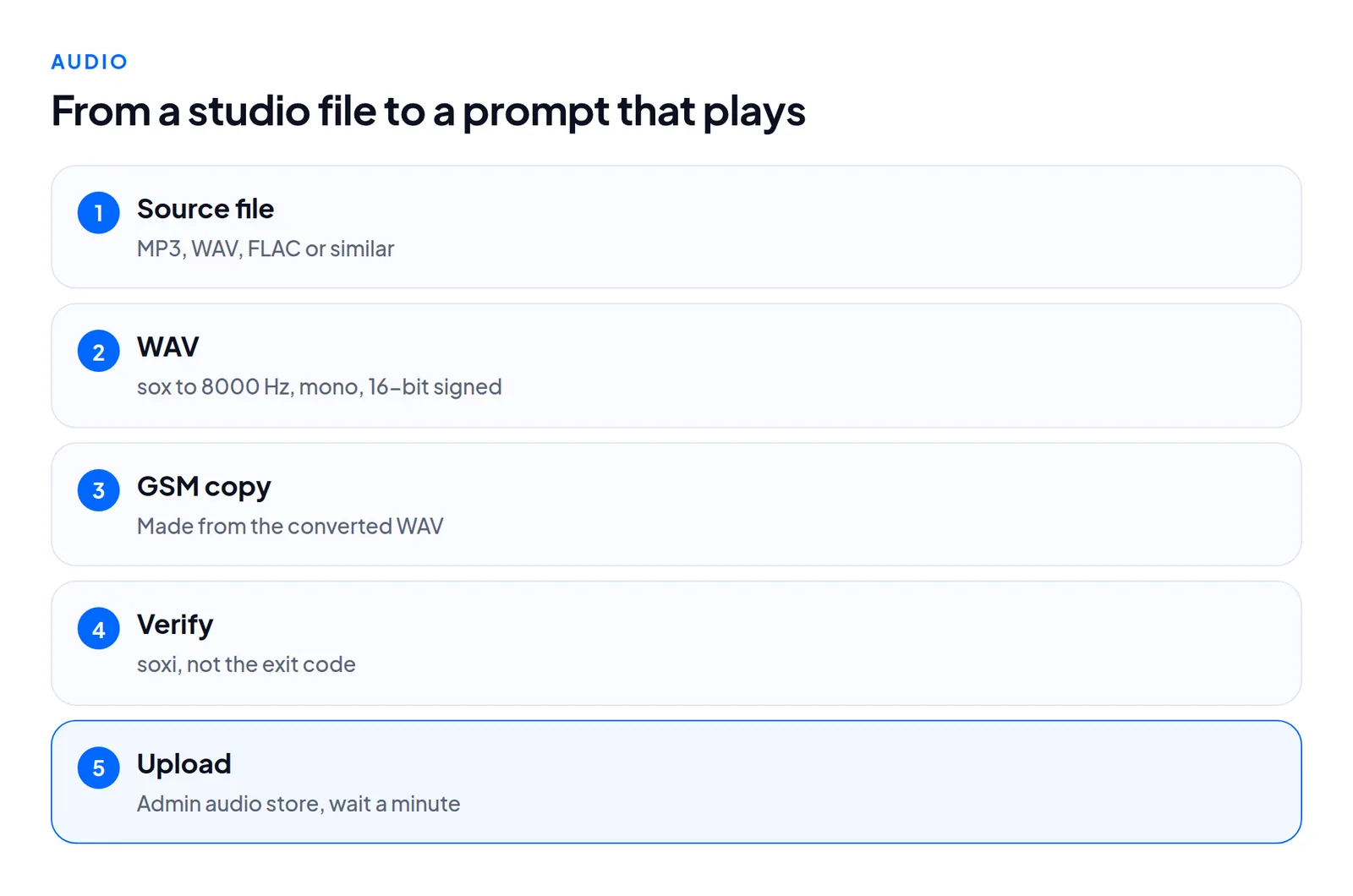
Asterisk picks the file cheapest to convert to the call's codec, and the stock library leans on GSM, so offering both under one name follows it. Browsers cannot play GSM, so listen to the WAV.
Verify with soxi, not the exit code
soxi welcome.wavIt should say 8000 Hz, 1 channel, 16-bit, Signed Integer PCM. sox exits with success on a wrong rate too, because it did what you asked. We broke the rate on purpose in a test: only the soxi check caught it. soxi reports zero length for a GSM file. VICIdial estimates GSM length as file size divided by 1650, so a zero is not a fault.
What converts on the box
The server had sox 14.4.2 with MP3 and GSM support, and lame, but no ffmpeg and no AAC decoder.
| Source | Converts with sox there |
|---|---|
| MP3, WAV, FLAC, Ogg, Opus, AIFF, AU, AMR | Yes |
| M4A / AAC (iPhone voice memos) | No |
For M4A, export MP3 or WAV on the device first. Check the source length before converting: a 5.3 MB FLAC decoded to 68.9 MB, and an hour of hold music can fill a small partition.
Where the files have to go
There are two directories. The audio store sits under the web root with a randomized name held in a system setting. The upload page writes there only, and the admin audio list shows it. The sounds directory is where Asterisk plays from: /var/lib/asterisk/sounds, a link to /usr/share/asterisk/sounds on ViciBox.
A sync script copies from the store to the sounds directory. It runs from the once-a-minute keepalive when the server's sounds_update flag is Y, which the upload page sets. In a cluster that is how a prompt reaches every dialer. Three failures follow:
- Copied straight into the sounds directory. It plays on that server only, never shows in the audio list and never reaches other servers.
- Uploaded and tested at once. Wait a minute for the sync.
- Plays on one dialer, not another. Check
sounds_updatein theserverstable and that the keepalive runs on the silent server.
Each file also gets a row in audio_store_details, without the vicidial_ prefix.
Names
Use letters, digits, hyphens and underscores, no spaces. In a call menu or in-group, give the name without the extension: welcome, not welcome.wav. Before deleting a prompt, check what plays it, because a menu pointing at a missing file fails silently for the caller. When searching the database for a name, an underscore is a wildcard in LIKE, so use an exact match.
What we measured
We made a 3.5 second, 44.1 kHz stereo WAV with a different tone on each channel, plus a 192 kbps MP3 of it. The different tones would expose a conversion that dropped a channel.
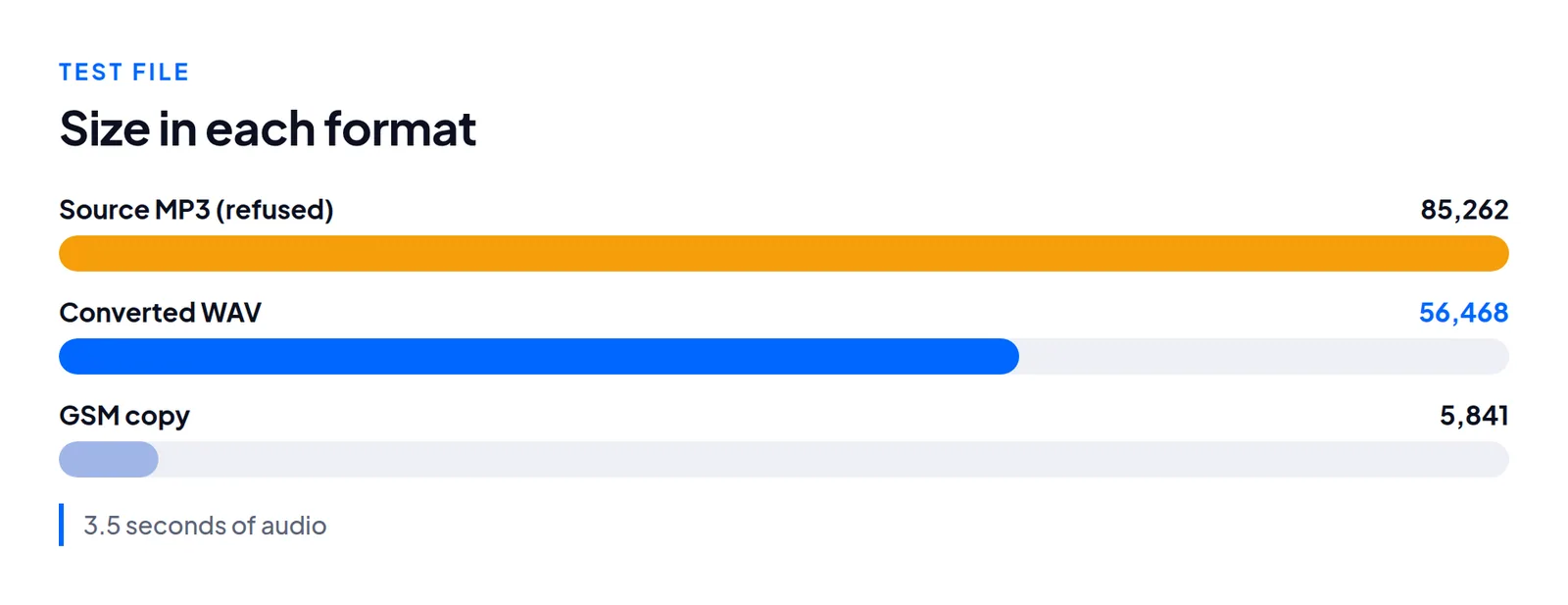
The MP3 was refused, the WAV was marked good, and conversion, both writes and the database rows took 576 ms. sounds_update went to Y and the keepalive cleared it within a minute, twice. This was one server and short synthetic tones. We did not listen-test speech after resampling. A voice with heavy bass or music will sound thinner at 8 kHz, so record plainly and listen over a real phone call.
Questions people ask
Why is my MP3 refused?
The page accepts only .wav and .gsm names. Convert with the two commands above.
Why does it play on one dialer and not the others?
The sync did not run there. Check sounds_update and the keepalive on that server.
Next steps
- Run
soxion your file. If it is not 8000 Hz, mono, 16-bit signed PCM, convert it. - Upload both files through the admin store, wait a minute, then call and listen.
- Keep your original recording elsewhere. The 8 kHz copy cannot be turned back into it.
Prompts usually go with new inbound numbers: see bulk-adding DIDs. Choppy audio during calls is a network matter, covered in LAGGED agents. On our hosted servers you upload an MP3 and we convert, place both copies and protect system prompts. See plans, or ask how we carry audio across.
VICIdial is a trademark of its owner. Trustane is an independent hosting provider.
Sources
- Trustane audio manager report, read from audio_store.php
- Trustane audio manager review
- Cover photo by Jessica Lewis 🦋 thepaintedsquare on Pexels
Managed VICIdial hosting