LAGGED agents in VICIdial are usually a network problem
LAGGED means an agent's browser did not check in for 30 seconds. Five measurements that show whether the cause is the network, the browser or the server.
To the point
LAGGED means no check-in from an agent's browser reached the server for 30 seconds. In the investigation we ran, three quarters of the events were the network path, a fifth were Chrome slowing a background tab, and the server was never the cause.
- 72 LAGGED pauses in one day while the server sat 71% to 95% idle.
- 74% had irregular gaps, often several agents together: the network.
- 19% had gaps of almost exactly 60 seconds, one agent at a time: browser throttling.
- Tuning TCP on the server did not change the rate.
What LAGGED means
We read the dialer script AST_VDauto_dial.pl. The agent screen calls the server about once a second, and each call updates last_update_time in vicidial_live_agents. The dialer finds any unpaused agent whose last update is more than 30 seconds old and pauses them with sub-status LAGGED. The 30 is fixed in the script, not a setting.
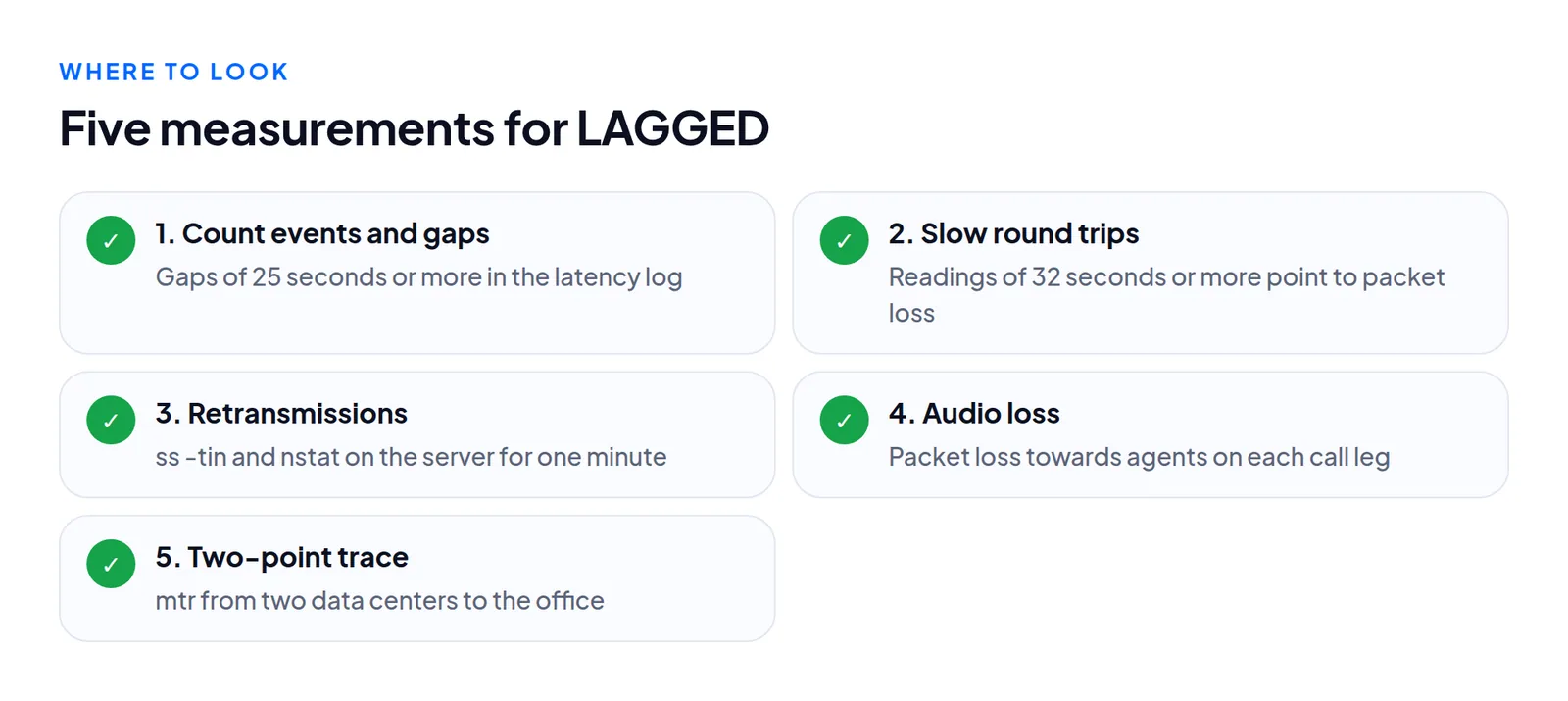
So LAGGED says one thing: for 30 seconds no check-in arrived. The server may have been too busy, the network may have lost the requests, or the browser may have stopped sending them. Five measurements separate those.
The five measurements
1. Count the events and the gaps. Count sub_status = 'LAGGED' in the last day, per agent. One agent with thirty events and a room with two each are different problems. Then read vicidial_agent_latency_log, one row per agent per sample, and list every gap of 25 seconds or more. We found 438 gaps and 50 events at the time we looked. Run DESCRIBE vicidial_agent_latency_log and write your query against what you see.
2. Look for slow round trips. Latency readings of 32 seconds or more that then succeed are the signature of TCP backing off after packet loss. A slow server does not do that.
3. Measure retransmissions on the server. Run ss -tin dst OFFICE-ADDRESS, and read TcpRetransSegs and TCPTimeouts in nstat across one minute. A healthy path retransmits a fraction of a percent.
4. Check the audio. Signalling and audio share a road. On chan_sip, sip show channelstats lists packet loss per leg.
5. Trace from two places at once. Run mtr to the office address from the server and from a machine in another data center. Loss on one and not the other puts the problem on that route.
Also record the server: CPU idle, web workers in use, and loss to a good public address.
What we measured
One floor, one working day, an office on a different continent from its server.
| Measurement | Result |
|---|---|
| Server CPU idle during events | 71% to 95% |
| Web workers in use | 95 of 768 |
| Server to a public address | 0% loss |
| Segments retransmitted towards the office, one minute | 5.7%, 264 timeouts |
| Audio packets lost towards agents | 5% to 19% per call |
| Server's data center to the office | about 20% loss, 288 ms |
| A second data center to the same office | 0% loss, 169 ms |
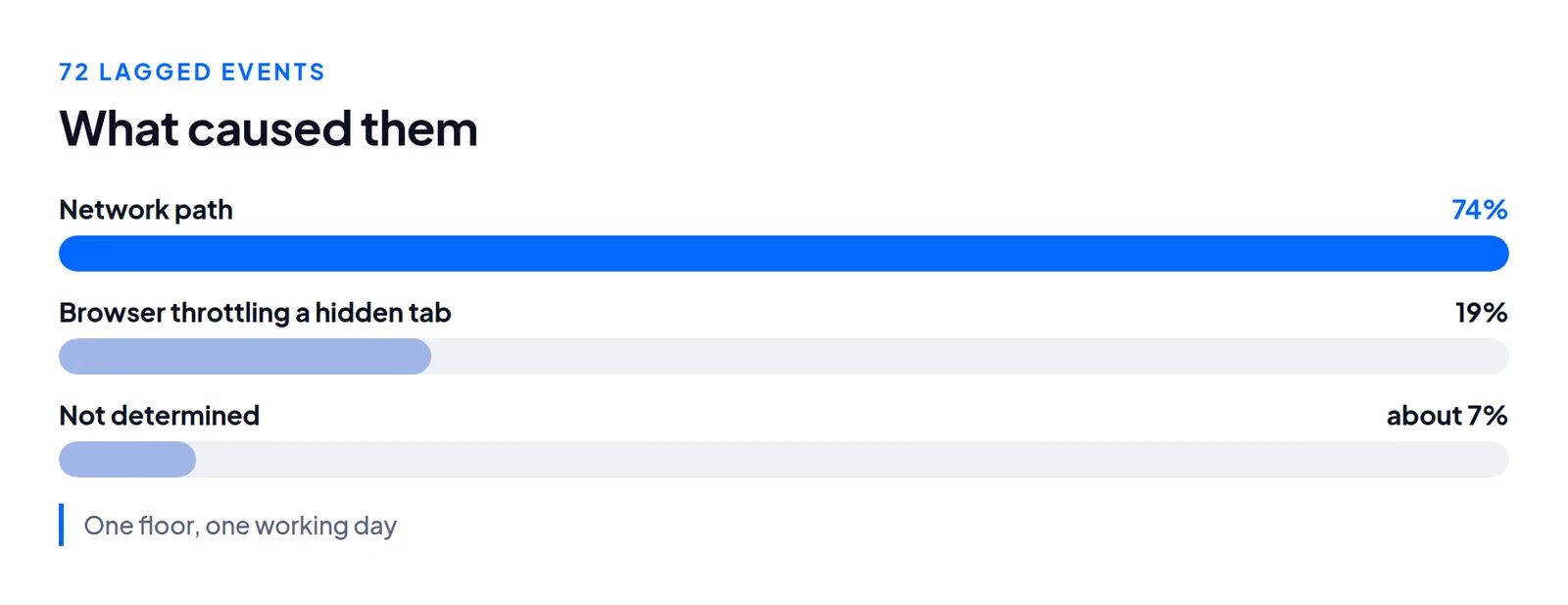
The clearest moment: ten agents went LAGGED within three seconds. For the 30 seconds before, the web log shows no requests from the office at all. Ten browsers do not fail together. A network path does.
The browser case: 60-second gaps
Chrome's "intensive throttling" applies to a page hidden for over 5 minutes, silent for 30 seconds, not using WebRTC, with chained timers. Timers then fire once a minute. An agent on a softphone or desk phone who reads another tab meets every condition, and the dialer pauses them at 30 seconds. The built-in browser phone uses WebRTC and may be less exposed. We did not test that.
What did not work
We tuned TCP: another congestion control algorithm, shorter thin-stream retransmission timeouts, no slow start after idle. It did not change the LAGGED rate. When the path drops every packet for 30 seconds, no retransmission tuning gets a check-in through. The real fixes concern the path: a different route, a server in a region with a clean path to that office, or a second internet line there.
Questions people ask
Is LAGGED a setting I can raise?
No. The 30 seconds is written into the dialer script.
How do I tell the office from the server?
Ask one affected agent to work from a phone hotspot for an hour. If their events stop, the office connection is the cause.
Next steps
- Count the events, list the gaps, and sort them: irregular, 60 seconds, other.
- If most are 60 seconds, change the timer setting, have everyone reload, and count again tomorrow.
- If most are irregular, keep the output of measurements 2 to 5 from the next bad hour. A carrier or ISP acts on a two-point
mtrfar sooner than on "agents keep getting paused".
If the box is busy, see lines per agent. If your floor is far from your host, moving the server closer is often the whole fix, and build times are short enough to test it. See VICIdial hosting or order a server.
VICIdial is a trademark of its owner. Trustane is an independent hosting provider.
Sources
- Chrome for Developers, timer throttling in Chrome 88
- Trustane trust report, agent connectivity checks and LAGGED counts
- Cover photo by Vladimir Srajber on Pexels
Managed VICIdial hosting