Starting a call center on VICIdial: the first 30 days
A week-by-week plan for a new VICIdial floor. What to settle before the first call, when to switch on auto-dialing, and the limits that bite in month one.

To the point
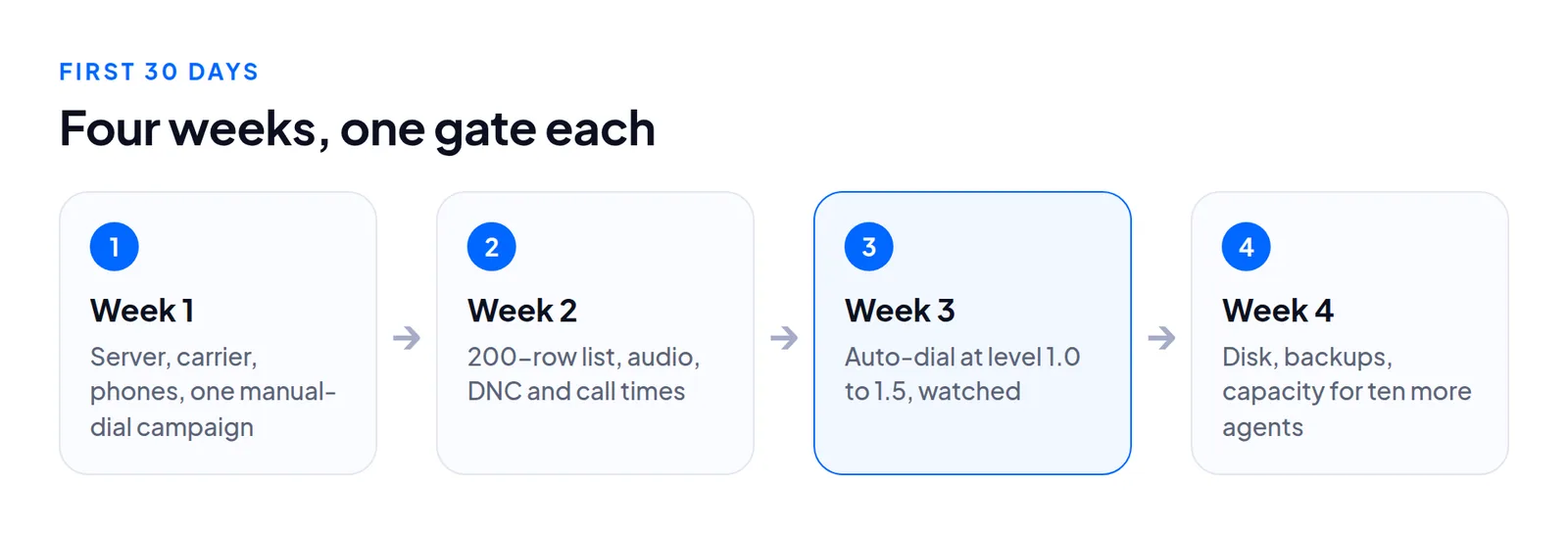
Start with one call that works end to end, then lists and rules, then auto-dialing at a low level with someone watching, then disk, backups and capacity. Each stage exposes problems the next would hide.
- Week 1: server, carrier, phones, one manual-dial campaign with 3 people.
- Week 2: a 200-row list, audio, do-not-call and call times.
- Week 3: auto-dial at level 1.0 or 1.5, real-time screen open.
- Week 4: disk, backups, and sizing for the next ten agents.
- A stock ViciBox 12 allows 23 lines for the whole box.
Before day one: four decisions
- Who runs the server? You, a contractor or a host. See hosted or self-hosted.
- Which carrier, and how many lines? Ask for the channel limit in writing.
- How many agents now and in six months? Raw recordings take about 58 MB per agent-hour. See recording storage.
- What kind of calling? Predictive, manual or preview, inbound, or a blend. Some rules are matters of law where you call. Write down who checks them.
Week one: a server that makes one call
Get the admin screen up over HTTPS on a real hostname and add the carrier. On current builds it may be chan_sip or PJSIP, set up differently: PJSIP carrier setup and which SIP codes to retry on another carrier. Make one outbound call from an admin phone to your mobile. Do not move on until it works.
Then create a user group, users and phones. Browser phones need the right template and a certificate for the hostname agents type (WebRTC phones). User-level changes apply at the next login, so tell agents to log out and in. Plan about 80 kbps each way per agent on G.711 (bandwidth per agent).
The manual describes starting an outbound campaign as seven screens: create the campaign, open its detail settings, add a list, load leads, set up a user group, create a user, and return to check the hopper. Use manual or preview dialing first. Have three people take fifty calls and look for one-way audio, dropped phones and missing dispositions.
Set it up, step by step
These are screens from our test server, campaign SUNQ4 (Sunline Solar Q4 callbacks).
In VICIdial's admin
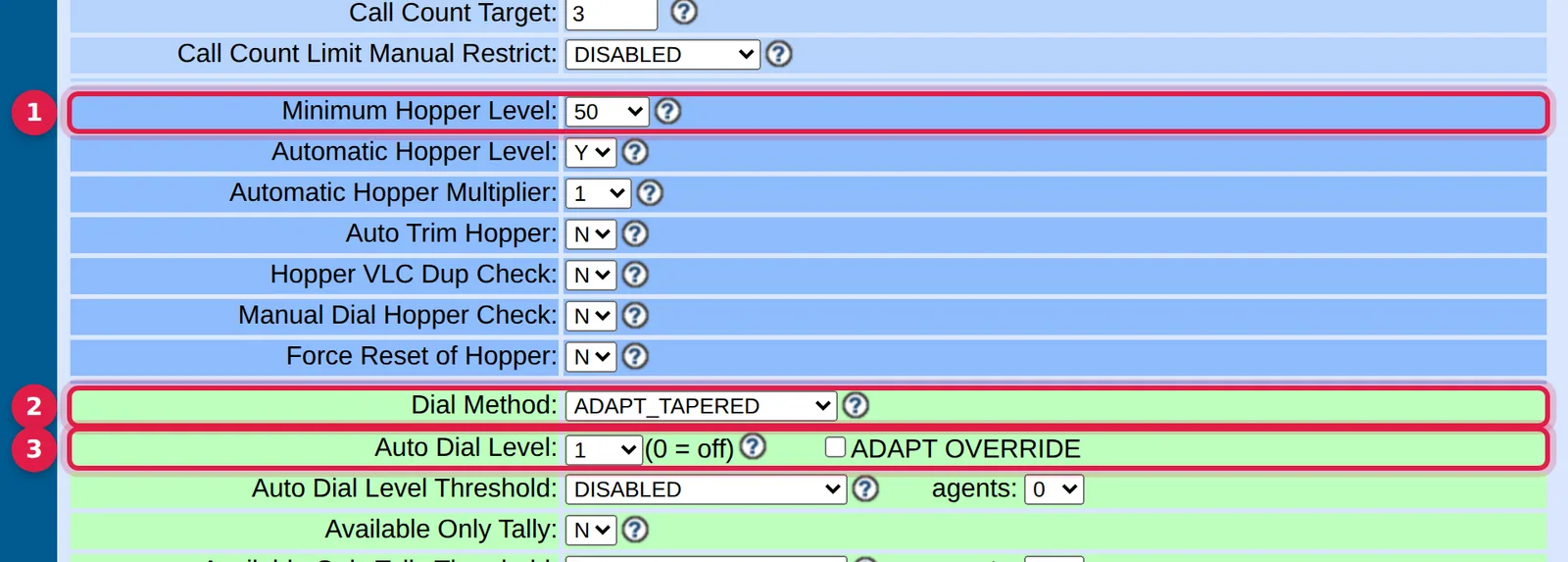
- Minimum Hopper Level (
hopper_level): leads the hopper keeps ready. It must be above zero for anything to dial. - Dial Method (
dial_method):MANUALor preview in weeks one and two,RATIOin week three. - Auto Dial Level (
auto_dial_level): 1.0 or 1.5 to start.
In the Trustane console
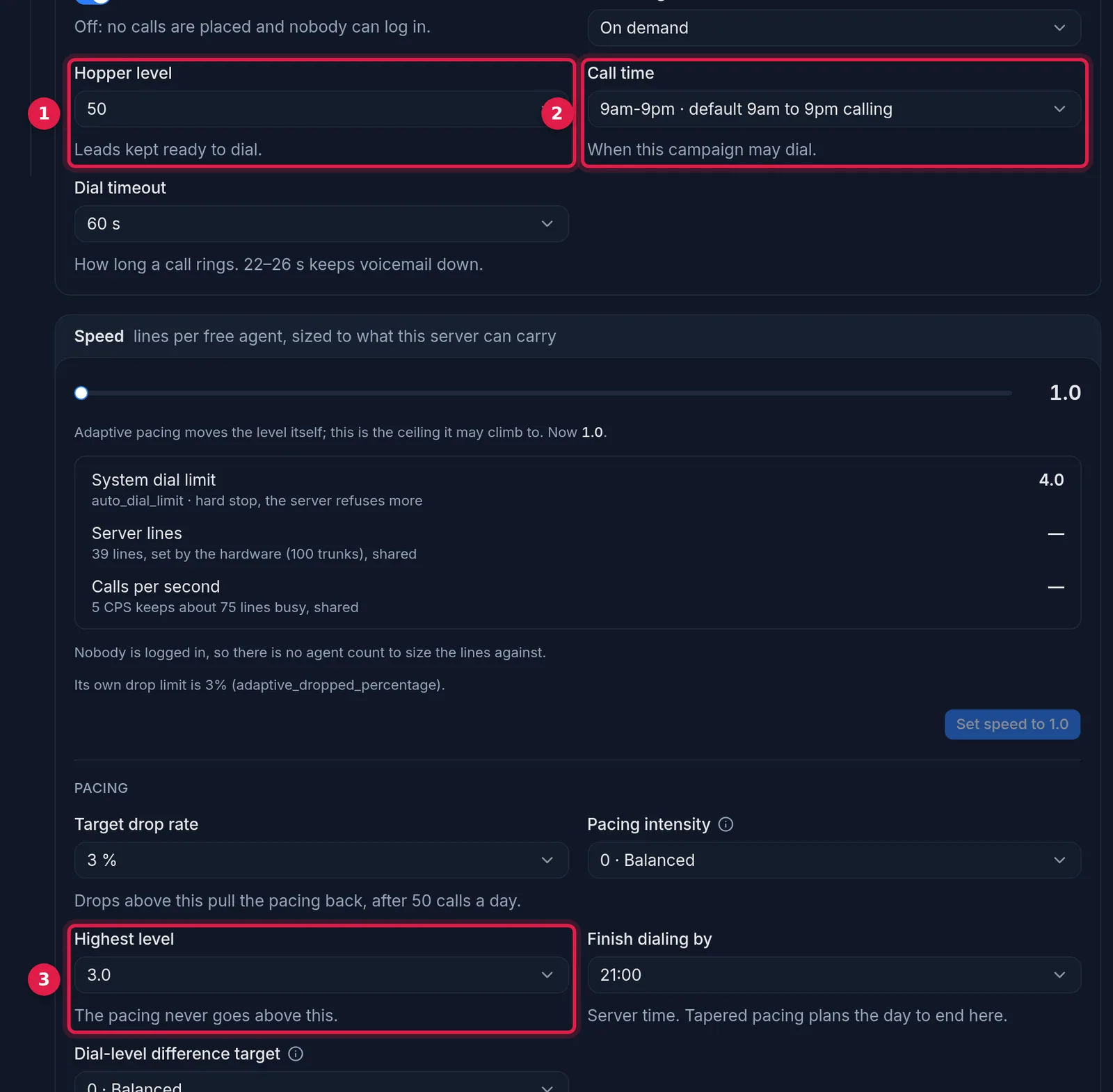
- Hopper level: the same field as Minimum Hopper Level.
- Call time: the calling-hours window the campaign uses.
- Highest level: the ceiling an adaptive method may reach.
Week two: lists, audio and rules
Load a small list first. 200 rows shows every kind of rejection. Through the API the call is add_lead (loading leads). We measured about 209 rows a second on a 1,000-row file. Create each list before loading, and always send the list check, since a lead sent to a missing list is invisible to the dialer. Open the list and look at five leads.
Find the internal and campaign DNC switches, the DNC flag on the agents' status, and the call-time window (DNC lists). The values are yours to set from the rules that apply to you. Any message or menu audio must be 8000 Hz, one channel, 16-bit WAV (audio upload).
Week three: auto-dialing, carefully
Switch to a ratio or predictive method at a low level with a small team and keep the real-time report open. Watch:
- Dialable leads and hopper, both above zero. If not, see the hopper article.
- Agents waiting versus calls ringing. Waiting agents mean the level can rise a little. Calls waiting mean it is too high.
- Dropped percent, computed per campaign.
- Trunk short. If it climbs you have hit the line limit. At 23 lines and level 3, the box stops adding lines at about 8 agents (lines per agent).
Week four: the unglamorous things
Write down free disk today and again in a week. A full disk on a single-server build stops recording, then stops the database writing. Take a nightly backup off the server and restore it once to a scratch machine; the time it takes is your outage if the server is lost. Pick the five numbers your manager wants each morning, and write a one-page handover. Before ten more agents, update lines (the 23 limit), bandwidth and disk.
Questions people ask
When do I switch on auto-dialing?
In week three, at level 1.0 or 1.5, with a small team and the real-time screen open.
How big should the first list be?
200 rows. That is enough to see every kind of rejection.
Next steps
Answering machine detection is covered in AMD accuracy. For the server side, see hosting and pricing, or order a server. Moving an existing floor? Start from migration.
VICIdial is a trademark of its owner. Trustane is an independent hosting provider.
Sources
- Manager manual findings, the steps to start an outbound campaign
- Capacity findings, trunk cap and lines per agent
- Lead loading research, add_lead and list handling
- Cover photo by Kampus Production on Pexels
Managed VICIdial hosting