Campaign dials but agents sit idle: what we check first
Agents waiting while a VICIdial campaign shows calls going out usually means pacing, not the list. Seven settings to read, in the order that finds it fastest.

To the point
If a campaign places calls and agents still wait in READY, the problem is the pace, not the leads. Read the server's line limit first, then the dial method and level, then the counting rule, and only then the list.
servers.max_vicidial_trunksis the box-wide line limit. Fresh ViciBox 12 ships it at 23.- A non-zero
local_trunk_shortagewith agents in READY is the signature of that cap. - On an
ADAPT_*method the script owns the level, and moves it down after drops. - AMD adds 2.9 to 4.8 seconds per answered call in our measurements.
If the campaign places no calls at all, start with reading the hopper.
1. The server's line limit
The dialer re-reads max_vicidial_trunks about every 25 seconds, so a change is live without a restart.
SELECT server_ip, max_vicidial_trunks, outbound_calls_per_second FROM servers;
SELECT campaign_id, SUM(local_trunk_shortage) AS short
FROM vicidial_campaign_server_stats GROUP BY campaign_id;
A shortage above zero while agents wait means the dialer wanted more lines than the box allowed. Raising the dial level does nothing here. See lines per agent.
Set it up, step by step
The pictures use our test server.
In VICIdial's admin

- Max Trunks (
max_vicidial_trunks): lines for the whole box. - Max Calls per Second (
outbound_calls_per_second): how fast new calls start, 1 to 200.
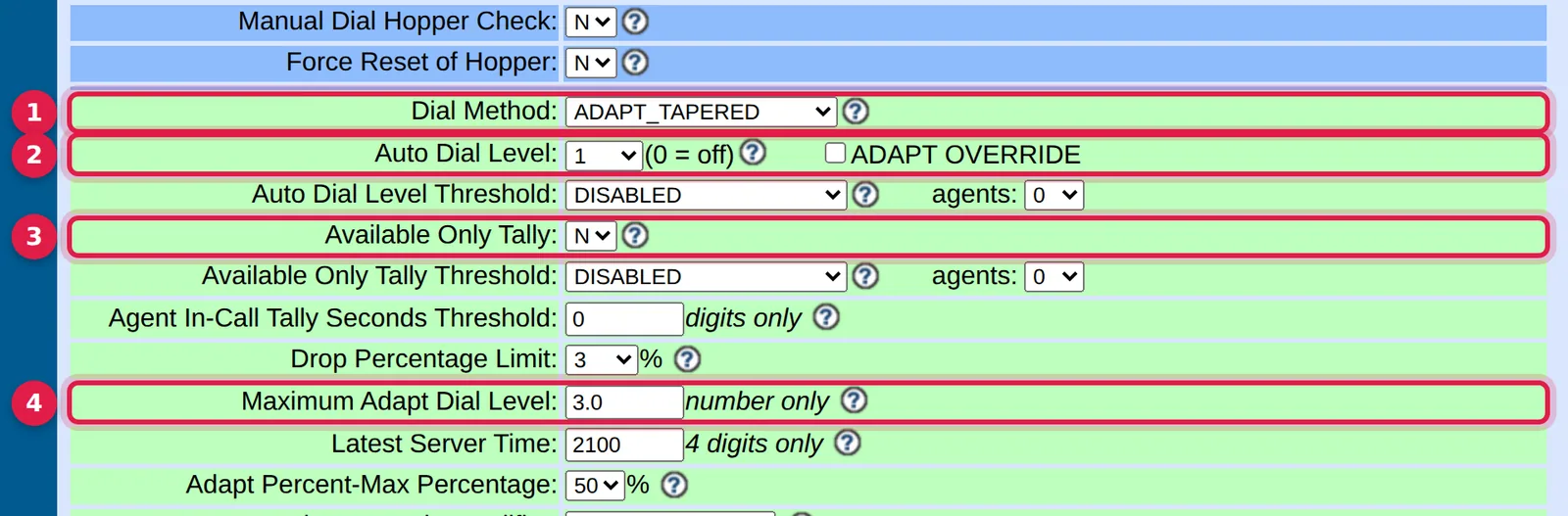
- Dial Method (
dial_method):RATIOor anADAPT_*method, notMANUAL. - Auto Dial Level (
auto_dial_level): lines per counted agent. - Available Only Tally (
available_only_ratio_tally):Ypaces only against free agents. - Maximum Adapt Dial Level (
adaptive_maximum_level): a low value leaves the script no room.
In the Trustane console
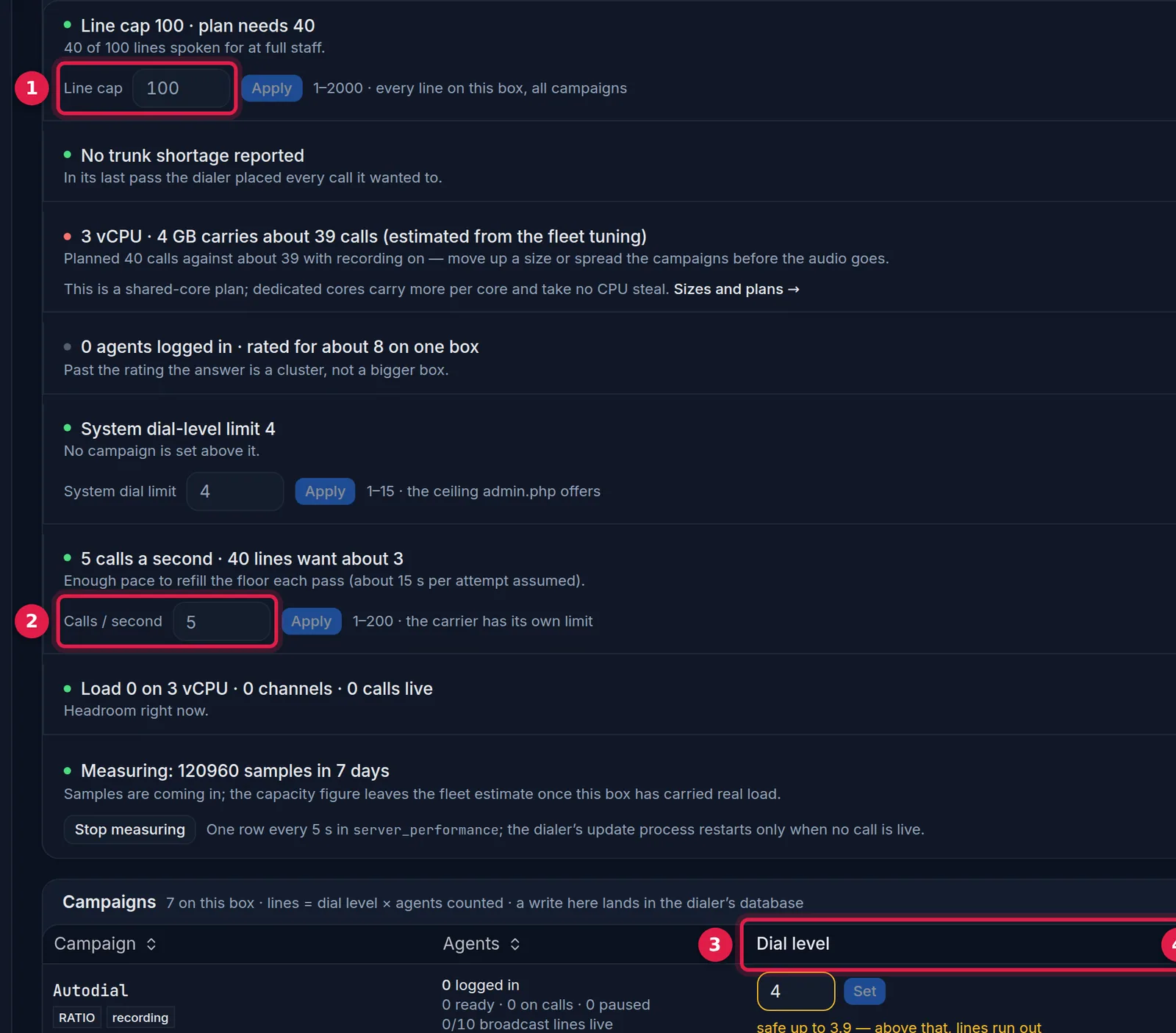
- Line cap: the box limit, read from the server.
- Calls / second: the origination pace.
- Dial level: what each campaign asks for.
- Lines: what it can actually use.
2. The dial method
MANUAL never dials for anyone, and INBOUND_MAN is similar. A level of 1.0 on RATIO means one line per agent, so agents idle through every ring and unanswered call. That is the method working as designed. See the dial level.
3. An adaptive method that backed off
With an ADAPT_* method the script moves auto_dial_level, and moves it down when drops pass the target. If agents were busy an hour ago and idle now, read the level twice, a minute apart, and check the last hour's drop percentage. The manual says the script reacts in 15 to 30 seconds.
4. Who counts as an agent
SELECT campaign_id, status, COUNT(*) FROM vicidial_live_agents GROUP BY 1,2;Agents counted means READY, plus INCALL unless available_only_ratio_tally is Y. With Y the dialer paces only against free agents, which is gentler and leaves a floor idle more often. PAUSED agents are not counted, so a floor full of paused agents asks for few lines. Remote agents count, so a broadcast campaign on the same box adds demand.
5. The pace per second
If outbound_calls_per_second is low and demand is high, originations are spread over time and lines arrive late. A 20 second ring needs several starts a second to keep 60 lines busy. The server re-reads it every loop.
6. Answering machine detection
Across 22,954 decisions we measured, an average analysis took 2.9 to 4.8 seconds depending on the verdict. Calls the detector was unsure about waited 4.8 seconds before an agent heard anyone. During that time the dialer sees a line in use and an agent idle. The manual suggests a shorter dial timeout instead. See AMD on ViciBox.
7. Carrier and network
With zero trunk shortage and the right level and method, look at what the carrier does. Many congestion or channel-unavailable results mean lines are consumed and no answers come. vicidial_carrier_log.dialstatus records them when sip_event_logging is on. If agents hear no audio or the screen shows LAGGED, see lagged agents.
A worked example
An illustration, not a measurement. Twelve agents on RATIO at level 2.0 ask for 24 lines. Agents idle and trunk short is zero. So the server was not the limit. Either fewer than twelve are counted (some PAUSED), or lines fail before an answer (carrier), or the answer rate is so low that 24 lines still yield too few people.
Now change one fact: trunk short is climbing. The same 24 lines met a limit of 23. You raise the limit and leave the dial level alone.
Reading the real-time screen
Four numbers answer most of it: agents waiting, calls ringing, calls waiting for an agent, and trunk short.
- Waiting agents, few ringing calls, no shortage: the level or the method.
- Waiting agents, many ringing calls: a low answer rate that no setting fixes.
- Calls waiting with nobody free: too many lines, and drops on the way.
What we did not test
This comes from reading the dialer code and the manual, and from one floor's history. We did not time each change on a live campaign. The order is effort and likelihood in the code, not a measured ranking.
Questions people ask
Does raising the dial level fix a trunk shortage?
No. The cap holds the real number down whatever the level says.
Why do agents idle at level 1.0 on RATIO?
One line per agent leaves them waiting through every ring and unanswered call.
Next steps
Run the two queries in step 1, then write down dial_method, level and maximum for each active campaign. Servers hosted with us get this check on request; an existing floor can move over, or see pricing.
VICIdial is a trademark of its owner. Trustane is an independent hosting provider.
Sources
- Trustane capacity findings, read from AST_VDauto_dial.pl
- Trustane notes on the VICIdial 2.14 manager manual
- Cover photo by Mikhail Nilov on Pexels
Managed VICIdial hosting