Where VICIdial keeps call recordings, and how long they stay
How VICIdial records a call, names the file and logs it, where the audio sits on disk, what decides how long it stays, and how to take it all with you.

To the point
A VICIdial recording is two things that live apart:
- A row in the
recording_logtable: when, how long, which lead, which agent, and where the file is. - A file on the server's disk, compressed to MP3 or another format by a scheduled job.
The row stays when the file goes. How long the file stays is decided by one line in the server's schedule, or by nothing at all.
Which calls get recorded
Recording is set per campaign, and there are four levels: NEVER, ONDEMAND (the agent starts it), ALLCALLS and ALLFORCE. With the last two, every call is recorded, after a short delay you can set. With ALLFORCE the agent's stop button is greyed out, so the agent cannot stop a recording either. If you look for a call and find no recording, the campaign's level is the first thing to check.
How a recording starts
When a recording starts, two things happen at once. The agent screen builds a file name, and the server writes a row into recording_log with the start time, the lead, the agent and that file name. A separate leg of the call then records the conversation into the file.
The file name follows a pattern each campaign sets. It is built from parts such as the date and time, the customer's number, the campaign, the agent, the lead ID and the call ID. One common pattern puts the full date and time first, then the number, the campaign and the lead, so a name reads like 20261121-101500_2125550186_SALES_7001. A suffix such as -all and the format's extension are added to the file.
Because the name carries the number and the date, you can often guess which file belongs to a call. Guessing is the slow way, though: the row in recording_log already links the file to its call, its lead and its agent.
Where the file ends up
The raw recording is written first and then handled by jobs that run every few minutes from the server's schedule. One of them compresses finished recordings into a folder of its own under the recordings directory; on the ViciBox servers we have read, that format is MP3. Other formats, such as GSM and OGG, get folders of their own when a server is set to use them.
When we read the schedule of our own test server, a ViciBox install, the MP3 job was running, the job that clears the uncompressed originals after a day was running, and the jobs that would copy recordings to another server by FTP were present but switched off.
By the time you look a call up, its row holds the length in seconds and the file's location, which is a full web address on the server. That is how admin.php and the reports play a recording: they follow the address.
How long a recording stays
Nothing in a recording's row says how long it is kept. The answer is in the server's schedule: a line that finds files in the recordings folder older than some number of days and deletes them. If that line is there and switched on, recordings older than that are removed. If it is missing, or switched off with a # in front of it, recordings stay until the disk fills or someone deletes them.
On our test server that line was present and switched off. It named 7 days, so a quick glance at the line would have said recordings last a week, when in fact nothing was deleting them.
Two things follow from this:
- A deleted file leaves its row behind. The call is still logged, with its length and lead, and a report still lists it. Only the audio is gone, and a play link then fails.
- The disk is the real limit. Recordings grow with every call. If nothing deletes them, plan the space; how much disk VICIdial recordings use per agent has the arithmetic.
VICIdial can also log every time someone opens a recording, with a setting called Log Recording Access and a report of who listened. Turn it on if several people can reach your recordings.
Finding one call again
The row is the way in. To find a call's recording by hand, you join recording_log to the call logs on the call's ID and to the lead on its lead ID, then filter by number, agent, date, outcome or length. That is a query, not a screen.
Taking them all with you
Recordings are files on one server's disk. When that server is deleted, they go with it, so the time to take them is before you cancel anything, not after. There are three things to collect:
- The audio files, in every format folder, not only MP3.
- The list: which file belongs to which call, lead and agent. Without it, a folder of files named by date and number is hard to use.
- The rows, if you are moving to another VICIdial, so the old calls keep their recordings there.
How the Trustane console handles it
On a Trustane server, the Recordings page reads the same row and the same schedule:

- Recording kept for comes from the delete line in the schedule, and reads Until deleted when that line is missing or switched off.
- Saved as comes from the compress job: the format the server really writes.
- The search joins the row to the call, the lead and the agent for you, by number, lead, agent, campaign, dates, outcome and length.
- A row whose file is gone is shown and marked, not hidden.
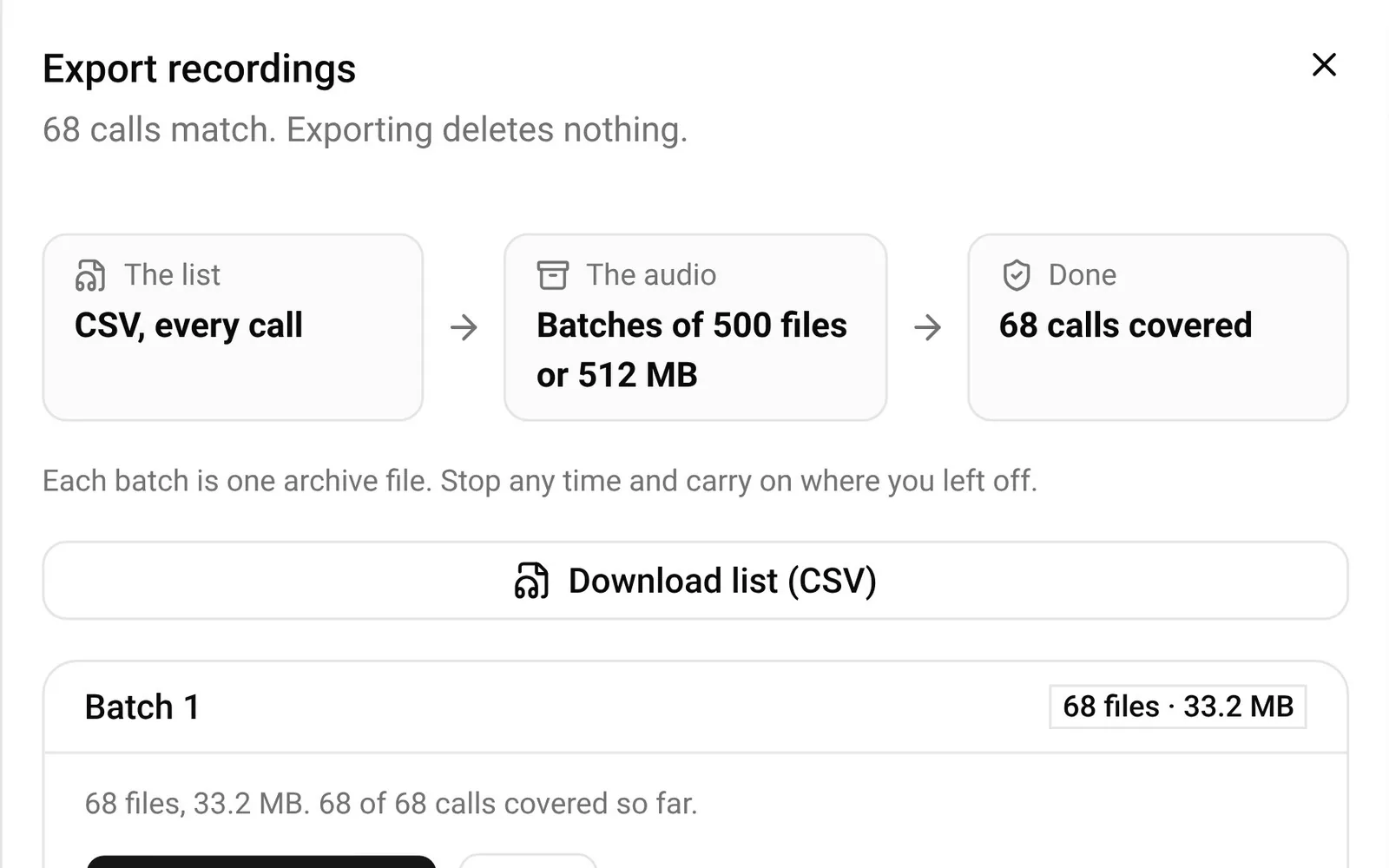
To take everything, Export these gives you the list as a CSV file and the audio in batches you can stop and resume. Exporting deletes nothing.
The step-by-step version is in VICIdial call recordings: find, play and download any call.
- Order a server, free for the first 7 days, and see where your recordings are from the first call.
VICIdial is a trademark of its owner. Trustane is an independent hosting provider.
Sources
- How the agent screen starts a recording and names it
- The recording settings in the VICIdial manual
- The recordings measured on our own test server
- How the console reads a server's recordings and its schedule
Managed VICIdial hosting