One shared dialer login: what it costs a call center
Many call centers run their dialer on one shared admin login. What it costs when someone leaves, and how to give each role only what it needs.

To the point
One login shared by the whole floor is easy on day one and expensive later:
- You cannot remove one person without changing it for everyone.
- You cannot tell who changed what.
- Everyone who has it can do everything, money included.
The fix is a login per person, with only the access their job needs.
How the shared login happens
A new dialer usually starts with one administrator. The owner signs in, a supervisor needs to pause a campaign, and the quickest way is to share the same login. Then a second supervisor joins, then a part-time quality checker, and the one login is now on several phones and notebooks.
Nothing breaks, so nothing changes. The costs show up later, and always at a bad moment.
Cost 1: someone leaves
When a person who knows the shared password leaves, the only safe step is to change it. That locks out everyone else at the same time, and the new password has to reach each of them again, often in a chat message.
If the person left on bad terms, the time between their last day and that password change is the window that matters, and with a shared login it is rarely short.
With a login per person, you disable one login. Nobody else is touched.
Cost 2: nobody knows who did it
A campaign was switched off at 16:00. A carrier entry was edited. A list of leads was deleted. With one shared login, each of these was done by "admin", which means anyone.
A login per person does not prevent mistakes, but it makes the conversation about them short.
Cost 3: everyone can do everything
A shared administrator login usually opens everything: carriers, server settings, billing and, on a hosted dialer, the button that deletes a server. The person who only needs to watch the floor carries the same power as the owner. A slip made with that login costs as much as a slip made by the owner, because it is the owner's login.
Most roles need far less:
| Person | Needs | Does not need |
|---|---|---|
| Supervisor | The floor, agents, leads, do-not-call lists, reports, listening to calls | Billing, carriers, deleting servers |
| Quality checker | Listening to recordings, reports | Changing anything |
| Technical lead | Carriers and server settings | Paying the bills |
| Owner | Everything | Nothing to remove |
Cost 4: the password travels
A shared password has to reach every new person, so it gets typed into chats, written on a note beside the screen and saved in browsers on home computers. Each copy is one more place it can leak from, and nobody ever goes back to clean them up.
What to do instead
- One login per person. Each with their own password, so leaving means disabling one login.
- A role, not the owner's access. Start from the closest role and narrow it.
- Separate money from the floor. Paying and topping up should sit with as few people as possible.
- Separate listening from downloading. Many people need to hear a call; few need to take recordings away.
- Limit people to the servers they work on, when you run more than one.
- Two-step sign-in for everyone who can pay or change who has access.
Moving off a shared login, step by step
- List who uses it today. Ask each supervisor who else signs in with it. The list is usually longer than expected.
- Pick a role for each person from the table above, and note anything they need on top of it.
- Invite them one by one, and check that each person can do their job with their own login before you move on.
- Change the shared password last, once everyone has a login of their own. Keep the new one with the owner only.
- Look at the list again a month later. Remove the people who have left, and ask about anyone who never signed in.
How the Trustane console handles it
On a Trustane server, the console has a Team page that follows these steps:
- Each person is invited by email and sets a password of their own, with room for up to 50 people on one account.
- Four roles: owner, admin, support and read-only. Support runs the floor and never touches money, carriers or settings.
- Rights can be ticked one by one, including listening to recordings and downloading them as two separate rights, and paying as a right of its own.
- Teams limit people to some servers.
- You choose who must turn on two-step sign-in.
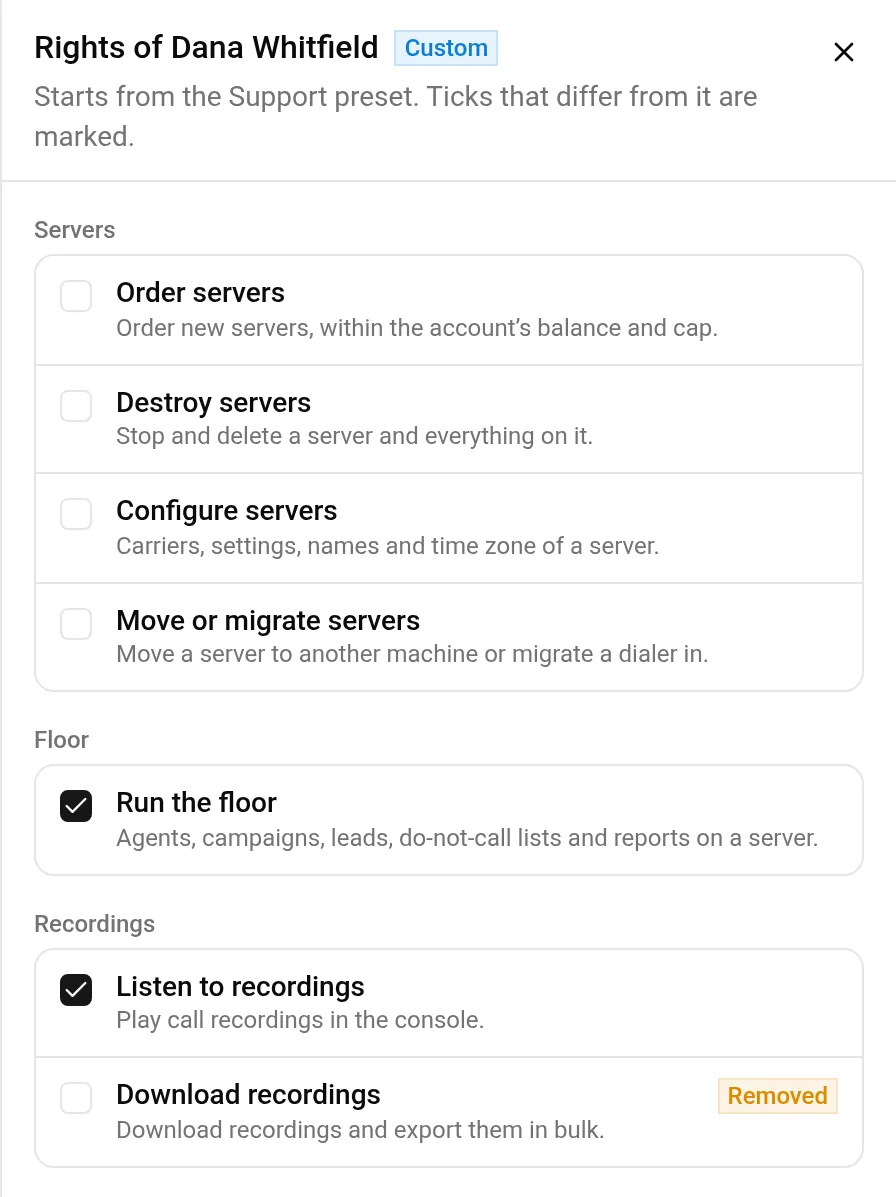
The step-by-step version, with screenshots, is in VICIdial team logins: a role and the right access for each person.
- Order a server and give each person their own login, free for the first 7 days.
- Or start free for 7 days and look around the console first.
VICIdial is a trademark of its owner. Trustane is an independent hosting provider.
Sources
- Roles and what each one opens
- The rights you can give one by one
- Teams and their servers
Managed VICIdial hosting