Add up to 100 VICIdial agents in one go
Create up to 100 VICIdial agents in one run in Trustane, each with a login and a phone, from a pasted list or number series, every ID checked first.

To the point
In the Trustane console, People, then Users & groups, then Add many creates up to 100 VICIdial agents in one run. Each one gets a VICIdial user and a phone whose login is the agent's own ID. Every ID is checked on the server before anything is written, the agents go in batches of up to ten, and you finish with a login card for each.
- Who: paste a list (spreadsheet rows paste as they are), or add By series: up to 10 number blocks such as 1001, each with its own level and user group.
- Settings: copy settings from an agent you already have, or start from VICIdial's defaults. Pick queues, Blended, and a web phone or a softphone.
- Passwords: random, one for all, or from your list. Phone passwords are always random.
- Create: batches of up to ten, with progress and Stop. Rows that fail come back through Fix and retry.
Plays from YouTube when you press Play. Google's privacy policy applies.
The pictures come from a demo account: every name, ID and group in them is made up, and the passwords are blurred.
Before you start
- A running server. The sheet reads the server first, and only a running server can be read.
- A user group, or make one inside the sheet (step 1).
- A web phone template on the server for web phones. Without one, the sheet says "This server has no web phone template. Pick Softphone."
Open Add many
- Open the server's People page and choose the Users & groups tab.
- Press Add many, next to Add user.
The sheet has four steps: People, Settings, Review and Create.
Step 1: who they are
Paste a list takes one person per line: a name; an ID and a name; or an ID, a name and a password. Spreadsheet rows paste as they are: a line with tabs splits on the tabs, any other on commas, and a "User ID, Name" header line is skipped. Rows without an ID take the next free IDs, and the line under the box says where those start.
By series builds the list from number blocks:
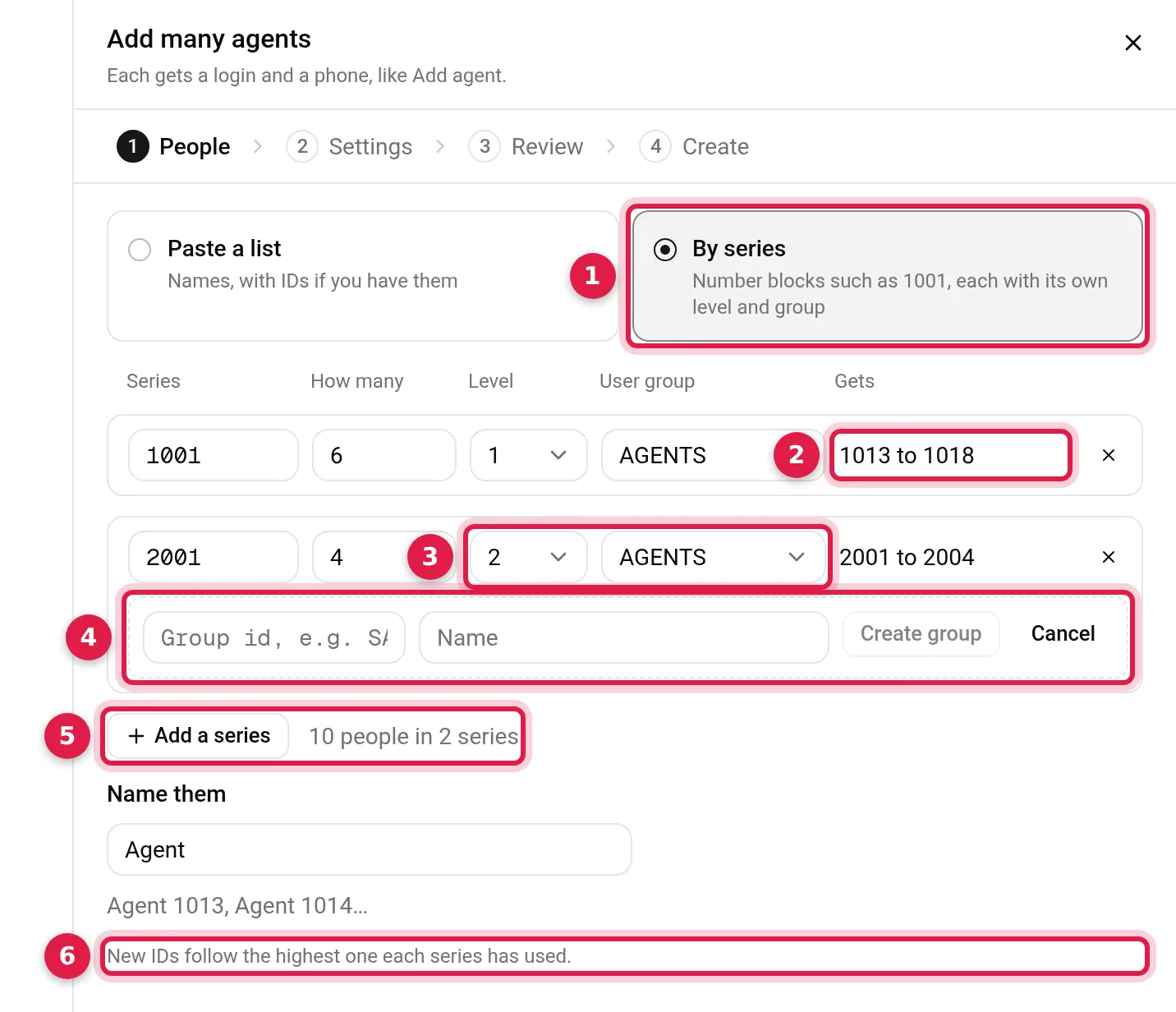
- By series: "Number blocks such as 1001, each with its own level and group."
- Gets: the exact IDs this row will get, read from the server as you type. On our demo 1001 to 1012 were in use, so six in the 1001 series get 1013 to 1018.
- Level and User group, per row. Levels run from 1 to 6.
- New user group: the last choice in a row's group list opens this form, so nobody leaves the sheet for admin.php. Create group makes the group on the server at once.
- Add a series: up to 10 rows, with the running total beside it.
- "New IDs follow the highest one each series has used."
A series is a block of a thousand: 1001 runs to 1999. IDs that only VICIdial's logs still remember count as used, and gaps below the highest one are left alone. A row that needs more IDs than its block has left stops with "The 1001 series has room for N more (up to 1999)." instead of spilling into the next team's numbers. Name them sets the start of each name, so the first agent here is "Agent 1013".
One run takes up to 100 people across every series or line. Past that, the sheet says "At most 100 at a time." with your count.
An ID is 2 to 15 letters, digits, _ or -. VICIdial allows a User Number of up to 20 characters (manual, page 85), but its table definitions give a phone's login 15, and here the phone's login is the agent's ID.
Step 2: what they start with
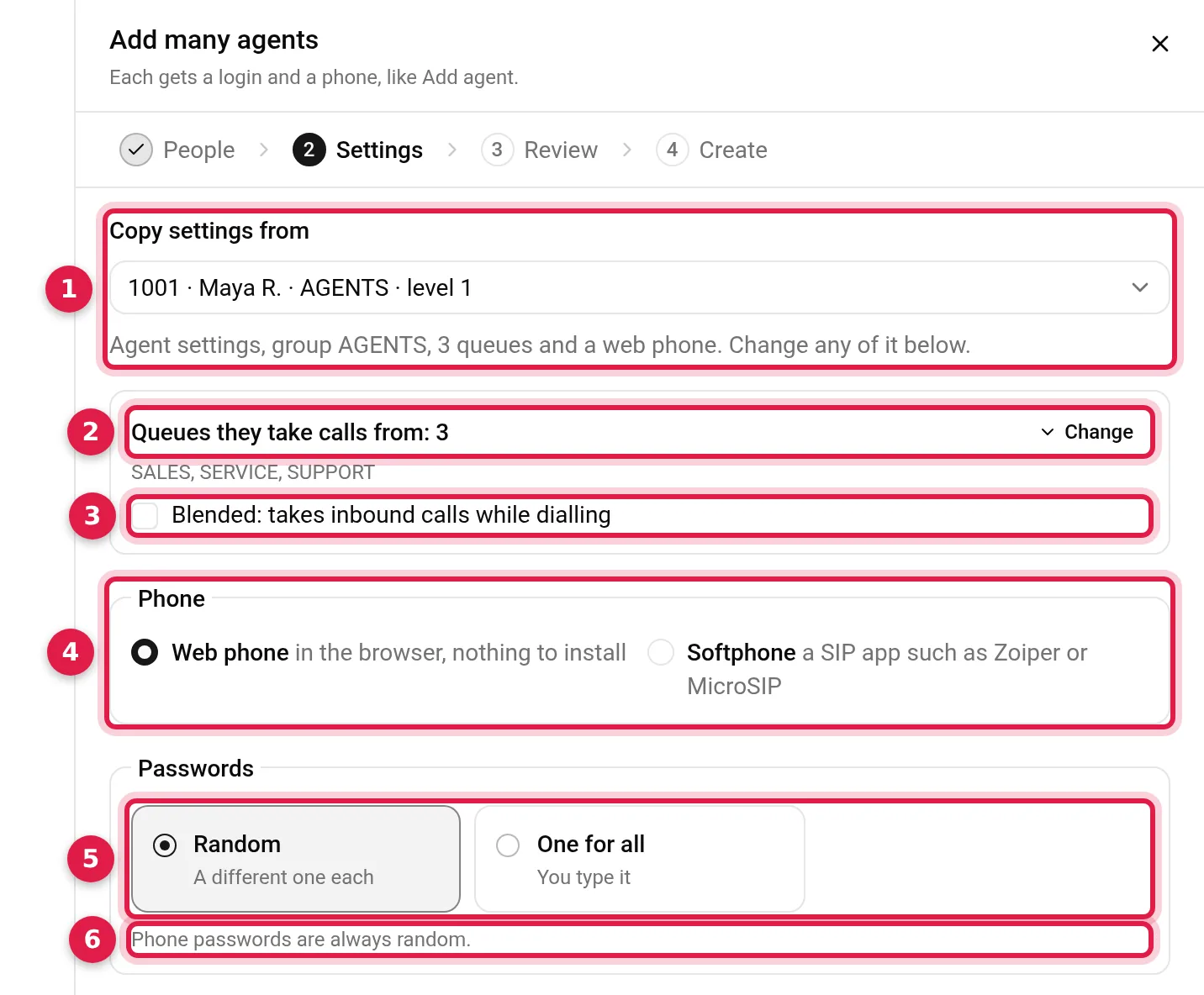
- Copy settings from: an active agent on the server (levels 1 to 6), or Nobody: VICIdial defaults, "The settings admin.php gives a new user." Copying takes the agent-facing settings and the queue and campaign ranks, never the password, the phone or an admin permission.
- Queues they take calls from: filled in from the agent you copy. Change opens the full list.
- Blended: "takes inbound calls while dialling".
- Phone: Web phone, "in the browser, nothing to install", or Softphone, "a SIP app such as Zoiper or MicroSIP". Every new web phone gets the server's own web phone template, even when the copied agent uses another.
- Passwords: Random, a different one each, or One for all. From my list appears when your list has a third column.
- "Phone passwords are always random."
With a series, level and group come from each series row. With a pasted list, this step asks for one Level and one User group for everyone. A password you type has 8 to 40 letters, digits, _ or -, and meets the server's own minimum length if its System Settings set one.
Step 3: review every row
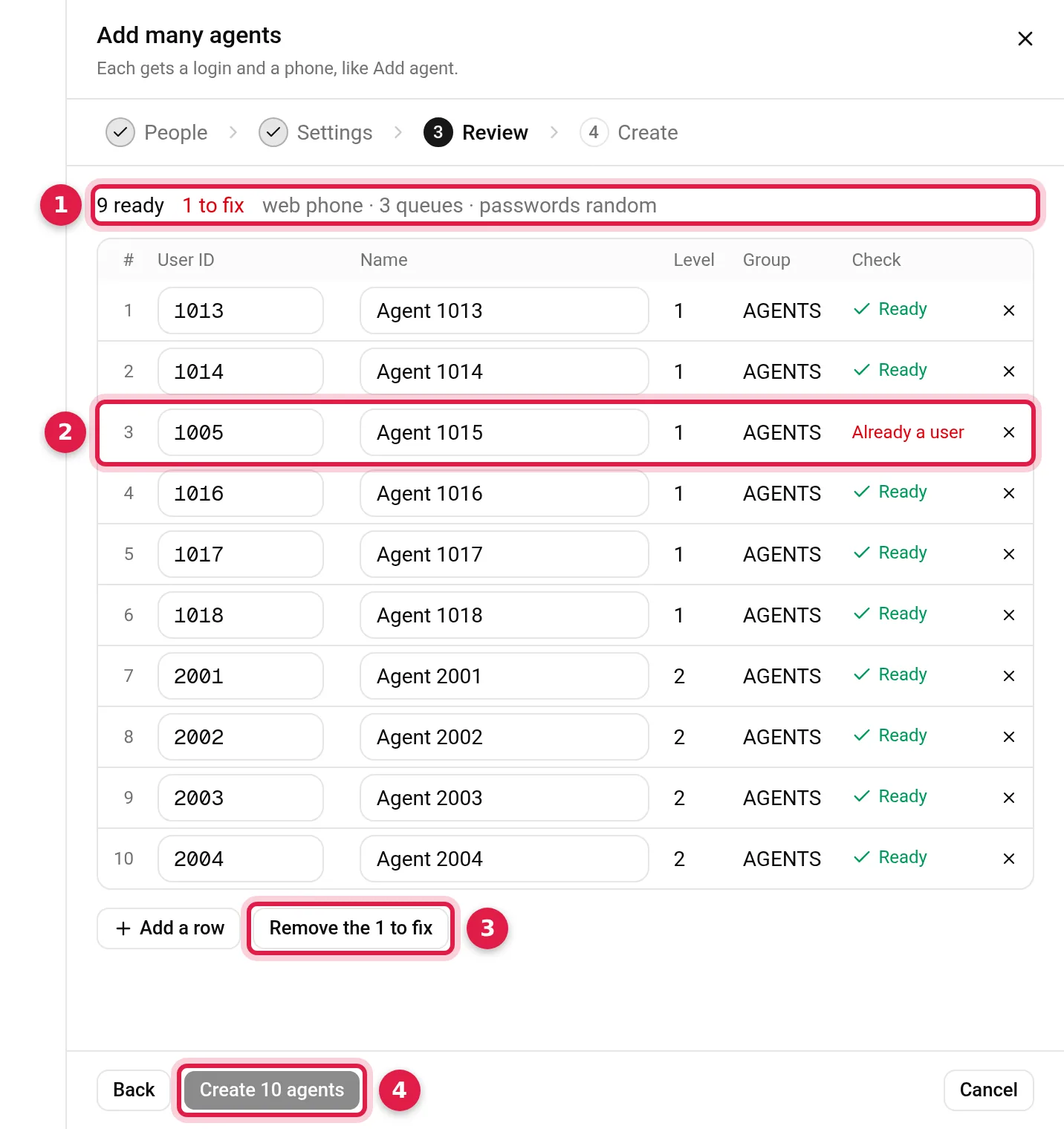
- Ready and to fix: the counts, with "Checking IDs on the server" while the check runs.
- A row to fix: we typed 1005, an existing agent, into row 3, and its Check reads "Already a user". Any User ID or Name can be edited here, and × removes a row.
- Remove the 1 to fix: removes every row with a problem at once.
- Create 10 agents: stays off until every row is Ready.
Before anything is written, Trustane checks every ID against the server's users, its phones' logins and extensions, and VICIdial's user and agent logs. Check names the problem: "Already a user", "Already a phone", "Used before", "Twice in the list", "Same as the template", or the rule an entry breaks. IDs are compared without regard to case (why that matters). Names are up to 50 characters, with no double quotes, backticks, backslashes, $ or ;.
Step 4: create, in batches
Create sends the rows in batches of up to ten. A batch only takes rows with the same level and user group, so each series goes in batches of its own. The sheet shows "Creating 4 of 10" and a progress bar.
- Stop "Stops after the batch of 10 in flight." Later rows are never sent. Closing the sheet mid-run does the same.
- At the end it counts what was created, what was not and what never started, with each failure's reason.
- Fix and retry takes those rows back to Review, where the server checks them again, since a failed row may exist by then.
Inside a batch each agent is made on its own, so one refusal does not stop the rest, and the server checks each ID again just before writing it. If an agent's phone cannot be written, the user is taken back out, so nobody is left with a login and no phone. Each batch asks the server to rebuild its phone configuration once, not once per phone.
Every agent ends up as a VICIdial user plus one phone record whose extension and login are the agent's ID. How that pair works is in VICIdial phones, WebRTC and templates.
Save the login cards
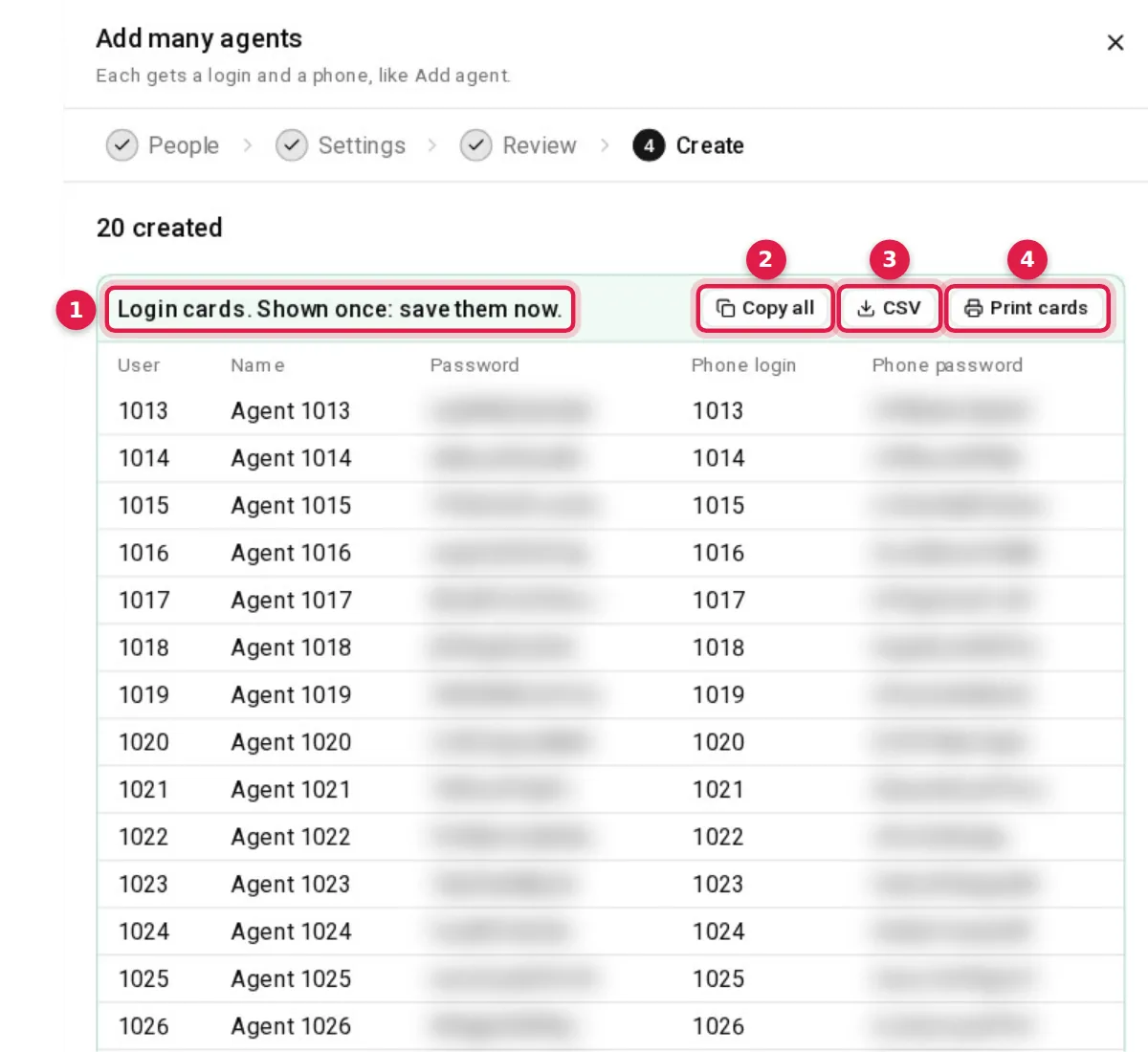
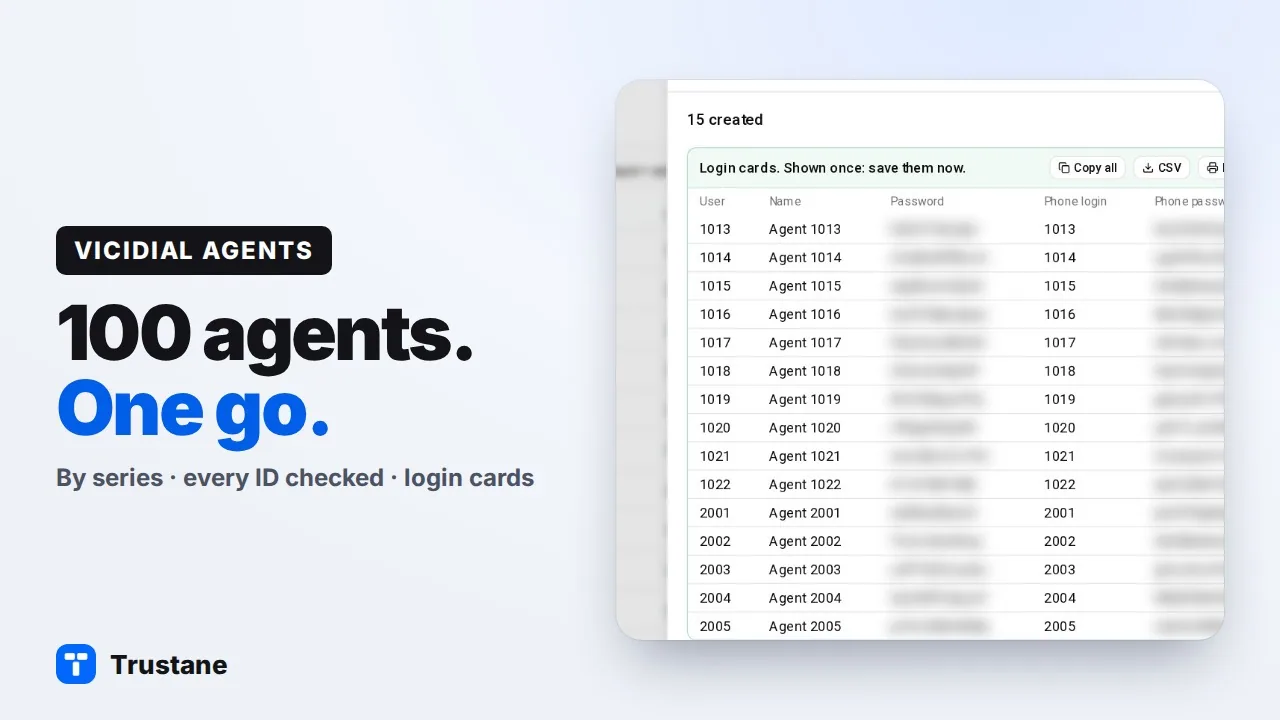
- Login cards. Shown once: save them now. One row per agent: User, Name, Password, Phone login and Phone password.
- Copy all: the table, tab-separated, to paste into a spreadsheet.
- CSV: a dated file with each agent's logins, passwords, phone type and where to sign in.
- Print cards: one card per agent, two across, with dashed edges to cut along. It prints from the page, so no window opens.
The limits in one place
| Limit | Value |
|---|---|
| People in one run | 100 |
| Series rows | 10 |
| One batch | up to 10 rows with the same level and group |
| User ID | 2 to 15 letters, digits, _ or - |
| A password you type | 8 to 40 letters, digits, _ or - |
| Level | 1 to 6 |
Questions people ask
Can I add agents without a phone?
Not with Add many. Every agent it makes gets a phone: a web phone unless you pick Softphone.
What happens to an ID that a deleted agent used?
If VICIdial's user or agent log still holds it, Trustane treats it as taken: Review marks it "Used before", and a series counts past it.
Can one run mix levels and user groups?
Yes, with series. Each row has its own level and group, and goes to the server in batches of its own.
Next steps
Open a server's People page, then Users & groups, then Add many. To change an agent's queues later, see assigning in-groups from the Floor. When a browser phone will not register, see WebRTC phones on ViciBox 12. For servers, see VICIdial hosting and pricing.
VICIdial is a trademark of its owner.
Sources
- Trustane console, the Add many sheet
- Trustane console, the settings a new agent starts with
- Trustane console, the limits the sheet and the server share
- Trustane console, how each agent and its phone are written
- VICIdial Manager Manual 2.14-960a, users
- VICIdial SVN r4037, the phones and users tables
Managed VICIdial hosting